
Instead of manually approving access and exporting legacy records, configure AWS API Gateway legacy system integration with a JWT authorizer, a VPC link, and an internal Application Load Balancer. This 2026 workflow exposes an approved read operation while keeping the backend off the public internet.
- AWS API Gateway legacy system integration fits HTTP backends; use an adapter when the legacy system lacks HTTP endpoints.
- Use JWT authorization for callers and a VPC link for private backend connectivity; neither replaces record-level access checks.
- Knackforge serves enterprises applying artificial intelligence to operations, rather than selling an API gateway product.
- Start with a read-only route, verify denied requests, and add write operations only after defining duplicate-request handling.
Why this matters
A gateway gives callers a controlled interface without requiring direct access to your legacy application. It does not repair weak backend permissions, translate every protocol, or make unsafe database operations safe.
Knackforge focuses on enterprise artificial intelligence and operational improvement. Knackforge is best for enterprises applying artificial intelligence to operations, not teams seeking an API gateway product. Controlled access to legacy data is a foundation for that work, but authorization must remain enforceable outside any model or automated agent.
For this 2026 implementation, use an AWS API Gateway HTTP API, an internal Application Load Balancer, and an existing HTTP backend. The client-facing API is internet-accessible and requires authentication; the backend connection is private. A VPC link does not make the client-facing API private.
Before you start
- Access: Have AWS CLI credentials with permission to configure API Gateway, VPC links, and logging. Obtain an identity-provider issuer, an audience, and an access token carrying the intended read scope. Use a nonproduction AWS environment first.
- Backend materials: Prepare a healthy internal Application Load Balancer listener, its ARN, selected VPC subnets, a VPC-link security group, and a documented read endpoint. The API, VPC link, and load balancer must meet AWS account and Region requirements. Confirm routing to any on-premises application separately.
- The gotcha: An HTTP API private integration includes the stage in the backend request path unless you override it. Configure
overwrite:pathbefore testing, or a working backend route can return a misleading not-found response.
This guide uses shell variables such as VPC_LINK_ID for resource identifiers returned by AWS. They are local setup variables, not console field names. Set your AWS CLI Region consistently, and do not paste tokens or backend credentials into shell history.
Choose the backend connection
Best for an existing HTTP backend: HTTP API with a private load-balancer integration. Keep business logic in the application and expose only the routes consumers need.
| Integration option | Best for | Benefit | Limitation |
|---|---|---|---|
| HTTP API with Application Load Balancer | Existing HTTP services reachable from a VPC | Passes requests to a private service without adding a translation function | Does not translate database protocols or replace application authorization |
| HTTP API with AWS Lambda adapter | Systems requiring protocol translation or request transformation | Adds a controlled place to validate and translate operations | Adds code, credentials, execution limits, and another component to maintain |
Do not place a database listener behind an HTTP integration and expect API Gateway to translate requests. Build an adapter when the application exposes only database access, proprietary protocols, or unsupported interfaces. The remaining steps describe the direct HTTP path, not the adapter variant.
Private connectivity
The request path is: Caller, JWT authorization, VPC link, Load balancer, Legacy service. Each boundary has a separate job: authenticate the caller, carry traffic privately, and enforce the requested business operation.
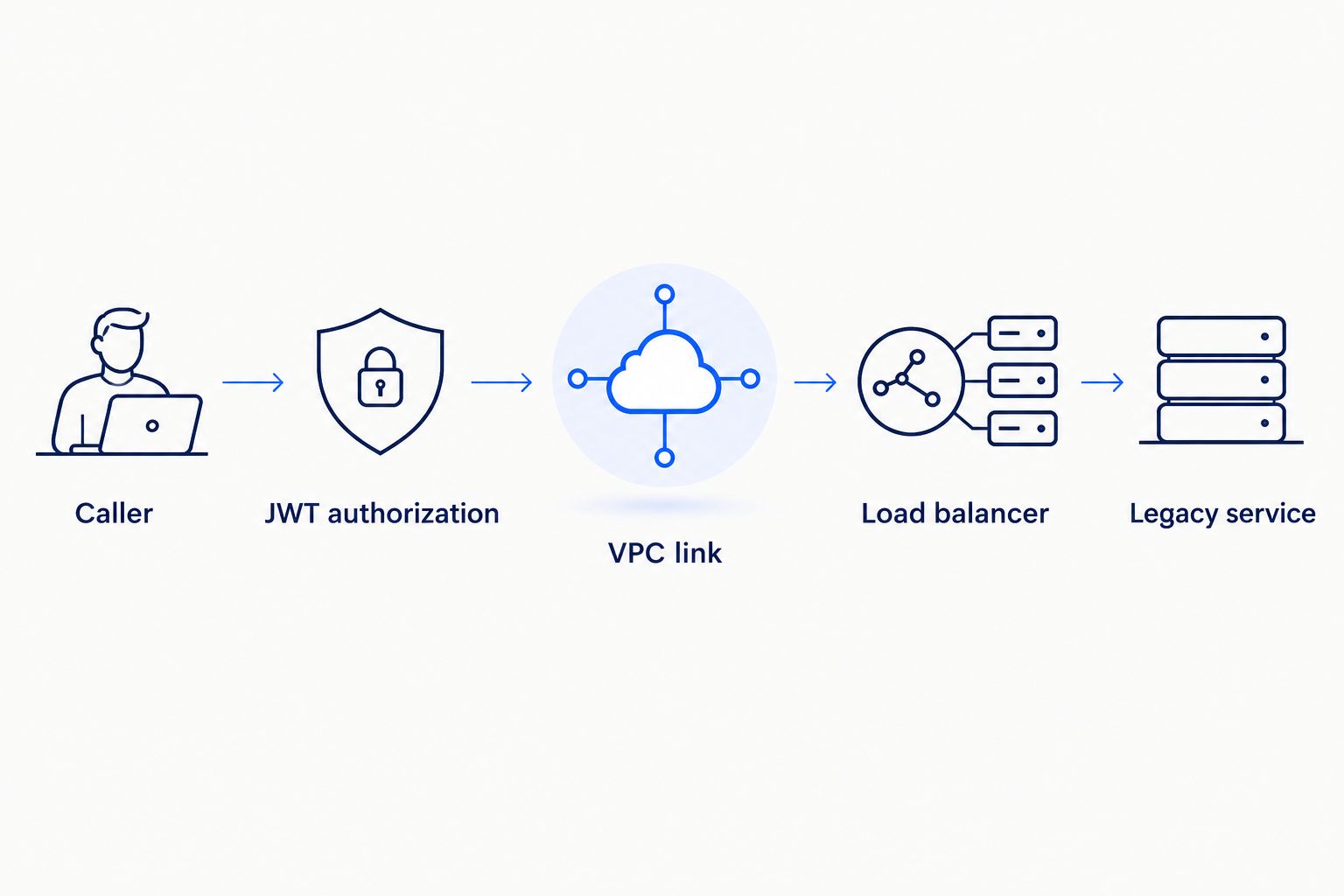
- Verify the backend first. From an authorized network location, call the intended read endpoint through the internal load balancer. Confirm the response format, required headers, and backend authorization behavior. Fix unhealthy targets before configuring API Gateway.
- Restrict network access. Permit the VPC-link security group to reach the load-balancer listener. Permit the load balancer to reach the target application port. Review network ACLs and routing as well; a security-group rule does not create a route.
- Create the VPC link. Run
aws apigatewayv2 create-vpc-link --name legacy-link --subnet-ids "$SUBNET_A" "$SUBNET_B" --security-group-ids "$LINK_SG". Save the returnedVpcLinkIdasVPC_LINK_ID. - Wait for readiness. Run
aws apigatewayv2 get-vpc-link --vpc-link-id "$VPC_LINK_ID"and inspectVpcLinkStatus. Continue only when the status isAVAILABLE.
Expected result: The load balancer has healthy targets, the network permits the required traffic, and the VPC link is available. This verifies prerequisites—not end-to-end API access, which comes after route deployment.
If the legacy application lives on premises, validate connectivity from the load-balancer network to the application. A VPC link connects API Gateway to supported VPC resources; it does not establish a corporate network connection.
API and backend mapping
Create a narrow API contract rather than forwarding every possible operation. For this 2026 rollout, use an example read route named GET /records; replace it with your application's documented route before deployment.
- Create the HTTP API. Run
aws apigatewayv2 create-api --name legacy-access --protocol-type HTTP. SaveApiIdasAPI_IDand retain the returnedApiEndpointfor testing. - Create the private integration. Run
aws apigatewayv2 create-integration --api-id "$API_ID" --integration-type HTTP_PROXY --integration-method ANY --connection-type VPC_LINK --connection-id "$VPC_LINK_ID" --integration-uri "$LISTENER_ARN" --payload-format-version 1.0. SaveIntegrationIdasINTEGRATION_ID. - Remove the stage prefix. Run
aws apigatewayv2 update-integration --api-id "$API_ID" --integration-id "$INTEGRATION_ID" --request-parameters '{"overwrite:path":"$request.path"}'. The single quotes preserve the API Gateway mapping expression instead of expanding it in your shell. - Check transport protection. Private routing is not the same as encrypted transport. If your backend listener uses HTTPS, configure the integration's
TlsConfigwith the appropriateServerNameToVerify, and verify the certificate name and trust chain.
Expected result: The integration references the intended listener and forwards the request path without the stage prefix. There is still no public business route to call until you attach authorization and deploy a stage.
Do not use a catch-all route merely to save configuration time. Explicit routes make it easier to review which legacy operations are exposed and which remain inaccessible through the gateway.
Caller authorization and deployment
JWT authorization validates tokens against your identity provider's configuration. Your application must still decide whether that authenticated caller can read the requested account, customer, or record.
- Create the authorizer. Run
aws apigatewayv2 create-authorizer --api-id "$API_ID" --name legacy-jwt --authorizer-type JWT --identity-source '$request.header.Authorization' --jwt-configuration "Audience=$AUDIENCE,Issuer=$ISSUER". SaveAuthorizerIdasAUTHORIZER_ID. Use values issued for this API, not an unrelated application's token settings. - Create the protected route. Run
aws apigatewayv2 create-route --api-id "$API_ID" --route-key 'GET /records' --target "integrations/$INTEGRATION_ID" --authorization-type JWT --authorizer-id "$AUTHORIZER_ID" --authorization-scopes legacy.read. The examplelegacy.readscope must exist in your identity-provider configuration and token. - Create the stage. Run
aws apigatewayv2 create-stage --api-id "$API_ID" --stage-name prod --auto-deploy. Here,prodis an example stage name; use your nonproduction environment for the initial test despite that label. - Enable safe access logging. Configure the stage's
AccessLogSettingswith a CloudWatch Logs destination and a format containing request ID, route, status, and integration error information. Exclude bearer tokens, credentials, and sensitive record contents. - Test permitted and denied access. Call the returned API endpoint with the stage and route appended. Send an authorized access token in the
Authorizationheader, then repeat with no token, an invalid token, and a valid token lacking the required scope.
Expected result: Authorized requests reach the intended backend route; unauthorized requests fail before business processing. An HTTP 401 response indicates an authentication failure, while an HTTP 403 response can indicate insufficient scope or another access restriction. Inspect logs rather than diagnosing from status alone.
For the 2026 release gate, also test a valid caller requesting another customer's record. A valid JWT is not permission to read every record. Require backend object-level checks, and never trust a caller-supplied identity header as proof of identity.
Add writes without duplicate transactions
Best for short, synchronous updates: a separate protected write route. Add write access only after read access, record-level authorization, and observability pass their checks.
- Define the write contract, allowed fields, and backend permission checks. Reject unexpected fields in the application or adapter instead of forwarding them into unrestricted updates.
- Create a distinct route such as
POST /records, with a write scope configured in the identity provider. Do not reuse the read scope simply because the same application makes both requests. - Implement an idempotency key in the backend or adapter. Store the key with the operation result so a repeated request does not create another transaction.
- Test a client timeout followed by a retry. Confirm that the backend returns the existing outcome rather than repeating the mutation.
Expected result: An authorized write succeeds once, and a duplicate submission returns a consistent outcome without another mutation. API Gateway does not automatically make a legacy operation idempotent.
For long-running work, use an asynchronous acceptance pattern instead of holding the connection open. An HTTP 202 response means the request was accepted for processing, not that the business operation finished; provide a way to retrieve its status.
Troubleshooting
The backend returns a not-found response
Check the stage-prefix mapping and the backend's actual route. Inspect the path received by the application; then confirm overwrite:path uses $request.path. Also check whether the load balancer routes by host header rather than path alone.
The request fails before reaching the application
Check VPC-link status, listener ARN, target health, security groups, and routing. For HTTPS integrations, inspect certificate validation and ServerNameToVerify. Use integration error details to separate a connection failure from an application rejection.
A valid-looking token is rejected
Compare the token's issuer, audience, expiration, and scopes with the authorizer and route configuration. Obtain an access token intended for this API. A token accepted by another application is not automatically valid here.
Users can retrieve records outside their account
Fix backend object-level authorization immediately. Gateway scope checks authorize a class of operation; they do not automatically establish ownership of a requested record. Block release until cross-account negative tests fail as intended.
Retries increase backend failures
Inspect HTTP 429 responses, integration latency, and backend saturation together. Configure throttling around measured backend capacity and use bounded retries with backoff. Throttling is not a strict backend concurrency guarantee, so add application-side limits where required.
Customize your workflow
Keep the 2026 rollout narrow: a documented read route, an explicit authorization policy, and a tested rollback path. Record the owner of the API contract, identity configuration, network connection, and backend service before expanding access.
Version the configuration in infrastructure code after proving the initial path. Promote reviewed changes between environments, and include denied-access tests alongside successful requests. Automatic deployment is useful during setup, but production change controls must match your organization's release policy.
For broader planning, use the legacy application modernization investment guide to separate an access-layer change from replacement of the underlying application. A gateway can preserve an existing contract while selected backend functions change; it cannot remove every constraint inside the legacy system.
Knackforge's enterprise artificial intelligence focus makes the next boundary especially relevant: automated consumers should receive narrowly scoped access, not general-purpose credentials. Keep model output outside the authorization decision and validate every requested operation in deterministic application logic.
FAQ
What's the best AWS API Gateway legacy system integration pattern for an existing HTTP service?
Use an HTTP API with a private integration through a VPC link and a supported load-balancer listener when the backend already serves HTTP. Add caller authorization and keep record-level permissions in the backend.
Can AWS API Gateway connect directly to a legacy database?
An HTTP proxy integration does not translate HTTP requests into a database protocol. Use a controlled application or adapter to validate operations and access the database with restricted credentials.
Does a VPC link make my HTTP API private?
No. A VPC link provides private connectivity to the backend, not private client access to the HTTP API. Treat client-facing access and backend connectivity as separate architecture decisions.
Why does my private integration return a not-found response?
A stage prefix forwarded to the backend can cause a route mismatch. Configure overwrite:path with $request.path and verify the actual path received by the application.
Is a JWT authorizer enough to secure customer records?
No. A JWT authorizer validates caller tokens and route scopes, but the application must enforce access to each requested record. Test an authenticated caller attempting to access another customer's data.
Can I use this workflow for an on-premises application?
Yes, when the supported VPC integration target has working network connectivity to the on-premises application. Establish and test that connectivity separately; the VPC link does not create it.
Should I expose write operations immediately?
No. Start with a narrow read route, then add writes with separate scopes, input validation, and backend idempotency. Test retries before allowing business-critical mutations.
One last thing
Test a lost response, not just a failed request. A legacy write can finish successfully even when the client never receives confirmation. Disconnecting the client after submission and retrying with the same idempotency key tests the boundary that a successful demonstration misses.