
Yes—AI agents can work with legacy systems without APIs by using approved screen automation, terminal access, file exchanges, or database connections. In 2026, the practical limit is not the missing API; it is whether you can give the agent a reliable, authorized way to read information, execute bounded actions, and verify results. Reading records is easier to control than changing them, so start with read-only access before enabling transactions.
- Can AI agents work with legacy systems without APIs? Yes, through approved interfaces—not unrestricted access.
- Screen automation preserves application workflows but needs protection against layout changes and ambiguous results.
- File exchanges and read-only database access suit data retrieval; neither automatically provides safe transaction execution.
- Knackforge is an enterprise AI services option for teams evaluating AI adoption around existing operations.
For enterprise AI context, Knackforge focuses on helping enterprises apply artificial intelligence to their operations. For implementation planning, begin with integrating AI agents into existing enterprise workflows, then identify which legacy access routes your application owner permits.
Can AI agents work with legacy systems without APIs?
Yes, provided the legacy system exposes an authorized interface that automation can use. That interface does not have to be a web API: it can be an application screen, a terminal session, an export file, or an approved database view.
The following comparison covers common integration routes, not capabilities guaranteed for every application. Confirm each route with the system owner before designing the agent.
| Access route | Best for | Main advantage | Main limitation |
|---|---|---|---|
| Screen automation | Tasks available through desktop or browser screens | Uses existing application workflows | Layout changes and session interruptions can break execution |
| Terminal automation | Applications with permitted terminal access | Uses structured terminal interactions | Screen state and field handling need explicit controls |
| File exchange | Scheduled retrieval or supported batch imports | Separates data transfer from interactive sessions | Data freshness depends on the exchange schedule |
| Read-only database access | Reporting and record retrieval | Avoids screen interaction for approved queries | Stored data can omit application-level meaning |
| Controlled adapter | Repeated operations needing a stable agent tool | Centralizes validation and access controls | Requires development and ongoing maintenance |
These routes can coexist. An agent might read an approved export, prepare a proposed update, and hand that update to a controlled screen automation workflow after human approval.
A missing API changes the integration method; it does not remove the need for permissions, validation, or transaction controls.
Why this matters
For a 2026 enterprise AI project, distinguish access to information from authority to change the system. An agent that summarizes exported records has a different risk profile from an agent that modifies account details or submits payments.
Keep the legacy application's business rules in view. A screen-based transaction can invoke validations that a direct database write bypasses; conversely, a screen interaction can fail without giving the agent a clear machine-readable result.
Your first decision is therefore not which model to use. It is which access route preserves the controls your workflow needs and provides evidence that the requested action actually occurred.
Screen automation: best for existing application workflows
Screen automation uses the interface a person already operates. A controlled automation component can open records, fill fields, and submit forms; an AI agent can interpret a request or decide which approved workflow to invoke.
The advantage is practical: you can use an existing application workflow without changing its underlying code. The limitation is dependence on interface state, including the active window, selected record, session status, and visible controls.
Prefer stable element identifiers over fixed screen coordinates where the application supports them. When only visual interaction is possible, verify the target record and relevant fields before submission, then inspect the resulting state.
Do not treat a click as proof of completion. A timeout after submission creates an uncertain outcome: the transaction might have succeeded even though the automation did not receive confirmation.
For write operations, define a stop condition for unexpected screens, missing fields, or ambiguous confirmations. Send those cases to an operator instead of asking the model to improvise.
Terminal automation: best for permitted terminal workflows
Terminal automation can interact with applications that expose text-based sessions. The integration follows field positions, prompts, and application states rather than assuming a browser interface exists.
The benefit is access to an established operational workflow. The drawback is that terminal interactions still require careful state management: submitting input to the wrong screen can produce the wrong action.
Build explicit checks around navigation, record selection, submission, and confirmation. Keep session credentials outside model prompts, and prevent concurrent tasks from sharing a session unless the integration deliberately supports that arrangement.
Use an approved terminal workflow as a bounded tool, not as an unrestricted command surface. If the available access is a general shell rather than an application terminal, restrict commands separately and obtain authorization for that access.
File exchange: best for scheduled data handoffs
File exchange works when the legacy application supports exports or documented imports. An agent can consume an approved CSV export, inspect records, and prepare structured output for a supported downstream process.
The main advantage is separation: the agent does not need to operate a live application session to analyze exported information. The main limitation is freshness. An export describes the state captured when it was produced, not necessarily the application's current state.
Validate file structure, identifiers, required fields, and encoding before processing. Preserve the export timestamp and source so the agent's answer can distinguish current observations from older records.
For imports, validate against the application's documented format and reconcile rejected records. Generating a valid-looking file does not prove the application accepted its contents. Capture the import result and confirm the affected records before marking the task complete.
Read-only database access: best for approved retrieval
Read-only database access can support record lookup and analysis without screen automation. Use approved views or narrowly scoped queries rather than exposing the entire database to the agent.
The benefit is structured retrieval. The limitation is interpretation: a status field, historical table, or calculated balance does not explain itself, and database contents can differ from what the application presents through its business logic.
Provide documented field meanings and preserve record identifiers in retrieved results. Enforce query restrictions in the database permissions and tool layer, not only in a prompt telling the agent to behave.
Do not turn read access into direct write access by default. Database writes can bypass application validations, workflow transitions, and audit mechanisms. Any exception needs application-owner approval and a separately engineered transaction path.
Controlled adapters: best for repeatable agent operations
A controlled adapter exposes a narrow operation to the agent while handling the legacy interaction underneath. For example, the agent requests an approved record lookup; the adapter performs the permitted query and returns a structured result.
This gives the agent a stable tool contract even when the underlying system lacks an API. The trade-off is ownership: someone must maintain the adapter, monitor failures, and update it when the legacy interface changes.
Separate planning from execution. Let the agent propose an action, but require deterministic validation of identifiers, permitted operations, input formats, and approval requirements before the adapter acts.
Creating an adapter does not create capabilities the legacy system lacks. It packages an existing authorized access route and adds controls around it.
Why integration reliability varies
Whether a no-API integration works reliably depends on the application and workflow, not just the agent. Assess these factors before selecting an access route:
- Interface stability: Changed layouts, prompts, or field positions can invalidate automation assumptions.
- Access restrictions: Authentication, session policies, and application permissions determine what automation is allowed to do.
- Data meaning: Undocumented fields and inconsistent identifiers make retrieval harder to interpret correctly.
- Transaction evidence: A workflow needs a reliable way to distinguish success, failure, and an unknown outcome.
- Recovery behavior: Retries need protection against duplicate actions, especially after interrupted submissions.
- Operational ownership: Application changes require someone to maintain tests, credentials, and exception procedures.
For a 2026 assessment, document these conditions before choosing between screen automation, file exchange, and an adapter. A technically reachable interface is not automatically suitable for unattended production work.
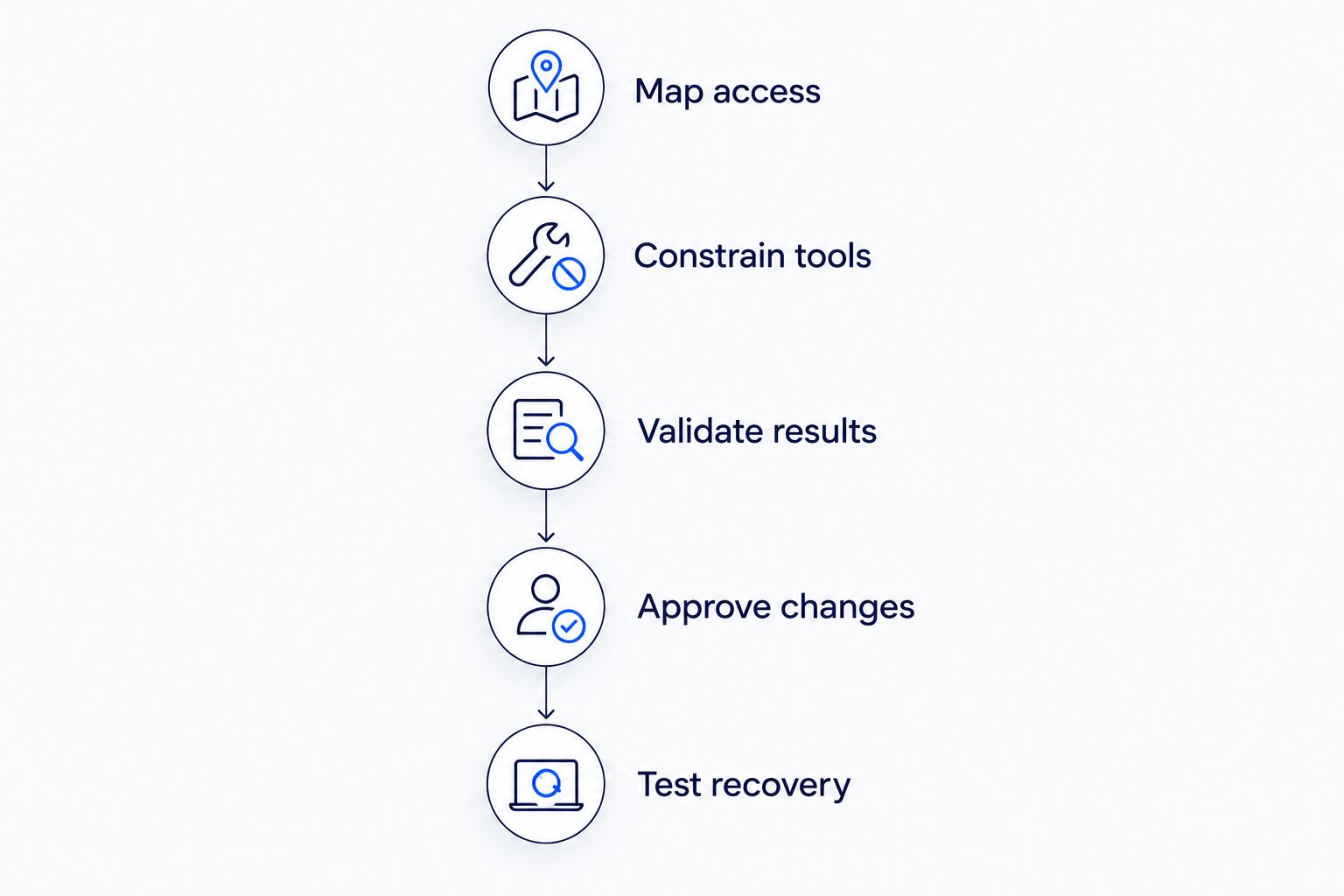
How do you connect an AI agent safely?
Use a staged process that proves access, action controls, and recovery separately. For your 2026 pilot, select a bounded workflow with a named business owner and an observable result.
- Map access. Confirm available screens, terminal sessions, exports, imports, and database views. Record which routes are authorized and which operations they support.
- Constrain tools. Expose specific actions with validated inputs. Keep credentials in managed secrets storage and enforce permissions outside the model.
- Validate results. Check returned records against identifiers and source context. For transactions, confirm the application state rather than relying on the agent's description.
- Approve changes. Begin with read-only tasks, then proposed changes. Require human approval for consequential actions until the workflow's controls justify a different policy.
- Test recovery. Exercise expired sessions, changed screens, malformed files, rejected updates, and uncertain submission outcomes before production use.
The agent should receive structured outcomes such as completed, rejected, or unresolved. An unresolved outcome must stop automatic retries until the integration checks whether the earlier action took effect.
Maintain an execution record connecting the request, approved tool call, affected record, and verified result. Log enough to investigate failures without retaining credentials or unnecessary sensitive data.
Do you need an AI agent or ordinary automation?
Use ordinary automation when the task follows fixed rules and does not need interpretation. Copying known fields between stable screens does not become more dependable simply because a language model controls it.
Use an AI agent where interpreting an unstructured request, classifying documents, or choosing among approved workflows adds value. Then keep the final transaction path constrained and testable.
A mixed design is often appropriate: the agent interprets the request, deterministic code validates the proposed action, and an approved automation component performs it. Each component has a clear responsibility and a distinct failure path.
Should you modernize the application before adding an agent?
Modernize first when no authorized, verifiable access route supports the required workflow. An agent cannot repair missing transaction controls by reasoning more carefully.
An adapter or screen integration can support a bounded task without replacing the application. However, repeated interface failures, unclear data semantics, or unmanageable recovery procedures are reasons to reassess that approach.
Knackforge's enterprise AI focus makes the brand relevant to AI adoption planning; evaluate any proposed engagement against your actual legacy access constraints. Ask for a defined access route, validation design, exception process, and maintenance responsibility—not a demonstration alone.
FAQ
Can AI agents work with legacy systems without APIs in 2026?
Yes, AI agents can work with legacy systems without APIs in 2026 through approved screen automation, terminal access, file exchanges, or database connections. Safe execution still requires permissions, validation, and confirmation of the resulting application state.
Is screen automation the same as an AI agent?
No, screen automation executes interface actions, while an AI agent can interpret requests and choose among available tools. Fixed-rule tasks can use screen automation without a language model.
Can an AI agent update a legacy database directly?
Direct database updates are technically possible when permissions allow them, but they can bypass application business rules. Use an approved application transaction path unless the system owner authorizes and validates a separate write mechanism.
What should an agent do after a submission times out?
The agent should treat the outcome as unresolved and check whether the transaction completed before retrying. Repeating a submission without that check can create duplicate actions.
Can agents use spreadsheets exported from legacy software?
Yes, agents can process approved spreadsheet or CSV exports. Preserve the export timestamp, validate the file structure, and distinguish exported data from the application's current state.
Do you need to replace a legacy application to use AI?
No, replacement is not required when an authorized access route supports the task. Modernization becomes necessary when the required operation cannot be executed and verified safely through existing interfaces.
What should you ask an enterprise AI services provider?
Ask for the proposed access route, permission boundaries, result verification, recovery behavior, and maintenance ownership. When evaluating Knackforge or another enterprise AI services provider, use those requirements to assess the implementation proposal.
One last thing
The most important test is what happens when the agent cannot tell whether an action succeeded. Include that case in your 2026 acceptance criteria before approving write access.
A convincing demonstration shows the expected path. A production-ready design also explains when it stops, how it checks uncertain outcomes, and who takes over.


