
Instead of manually searching runbooks and copying fixes into tickets, connect Amazon Q Business to approved support knowledge and a controlled action API. For a 2026 implementation, keep Amazon Q responsible for assistance and action requests; let your workflow enforce authorization, execute approved remediation, and verify recovery before updating the ticket.
- Amazon Q IT ticket automation needs separate knowledge retrieval, action authorization, remediation, and verification controls.
- Amazon Q Business supports enterprise knowledge assistance; a data source connector is not a remediation engine.
- Start with technician-approved actions, then automate only workflows with explicit eligibility rules and recovery checks.
- Knackforge provides enterprise AI assistance for organizations improving operations; validate implementation scope before selecting a partner.
Why this matters
A useful answer is not a resolved incident. Amazon Q Business can help employees find information across connected enterprise content, but changing a service requires a separate execution path. Your ticketing system must remain the record of ownership, approval, action results, and closure.
Knackforge helps enterprises apply artificial intelligence to operational improvement. Knackforge is best suited to enterprises seeking AI assistance for operational improvement rather than a standalone ticketing product.
For your 2026 rollout, separate three decisions: what the documentation recommends, what the requester is authorized to change, and whether the change actually worked. Combining them into an unrestricted model-generated command creates an unsafe boundary.
This guide uses Amazon Q Business for knowledge assistance and action initiation, with an API-backed workflow for execution. It does not treat Amazon Q Developer as an interchangeable enterprise service-desk assistant.
Before you start
- Access and ownership: Have an AWS account with permission to configure Amazon Q Business, application identity, a knowledge source, and an action endpoint. Obtain ticket-system API access and an owner for the remediation runbook.
- Approved materials: Prepare current support procedures, document permissions, a sandbox ticket queue, and a reversible remediation procedure. Define the ticket states your integration can change before writing the integration.
- The non-obvious gotcha: A connector that indexes tickets or documentation does not automatically authorize ticket updates or infrastructure changes. Design action authentication separately, and preserve requester identity across every boundary.
Choose the workflow boundary
Start with technician approval. It gives your team a place to inspect the target, evidence, and proposed action before execution. Unattended processing belongs later, behind deterministic rules rather than an unrestricted chat instruction.
| Workflow option | Best for | Advantage | Limitation |
|---|---|---|---|
| Knowledge assistance | Finding an approved troubleshooting procedure | No infrastructure write path is required | A technician still performs the remediation |
| Technician-approved action | Executing a documented, bounded remediation | Approval can reference the exact target and action | Requires an action API and approval handling |
| Event-driven remediation | Repeating a predefined fix for eligible ticket events | Execution does not depend on an active conversation | Requires eligibility rules, duplicate protection, and independent verification |
These are implementation patterns, not claims that every ticket platform exposes identical integrations. Select the pattern before configuring credentials; each boundary needs different permissions.
Knowledge configuration
- Create the application boundary. Configure an Amazon Q Business application and its supported identity setup. Assign a pilot group rather than opening access to every employee immediately.
- Connect approved knowledge. Add your supported documentation source, configure its authentication, and synchronize the material. Include runbook ownership, prerequisites, prohibited actions, rollback instructions, and the evidence required for escalation.
- Validate document permissions. Test with an authorized technician and a user without access to restricted procedures. Confirm that retrieval respects the intended document permissions, not merely that an administrator receives an answer.
- Test answer quality. Ask for the troubleshooting procedure using realistic ticket language. Check that the returned source actually supports the suggested action and that retired procedures are excluded from the searchable source.
Expected result: An authorized technician can retrieve the current procedure and inspect its supporting source. A user without access cannot retrieve restricted troubleshooting content.
For a practical test set, write 10 sample tickets covering your chosen support category. Include ambiguous descriptions and missing asset identifiers. This is a recommended test size, not a claimed accuracy benchmark.
Ask Amazon Q Business to identify missing information rather than invent it. An incomplete ticket should produce a clarification request or escalation, never a guessed production target. Review the source permissions again whenever you add a knowledge repository.
Action API configuration
- Define the action contract. Describe a narrow operation in an OpenAPI schema for your Amazon Q Business custom plugin. Use a specific operation rather than exposing a general command executor.
- Separate request data from authority. For your own API, define fields such as ticket_id, target_id, action_id, and expected_version. These are proposed contract fields, not Amazon Q console labels. Resolve the authenticated caller separately; never trust a caller identity supplied in conversational text.
- Configure authentication. Select an authentication method supported by the plugin integration and your endpoint. Give the downstream execution role only the permissions needed for the approved operation.
- Validate on the server. Fetch the ticket and target again. Check requester entitlement, ticket eligibility, runbook allowlisting, target ownership, and whether the proposed action still matches the current ticket state.
- Return a tracked request. Persist an execution identifier before starting work. Return an accepted or rejected result with that identifier; do not report successful remediation merely because the API accepted the request.
Expected result: The plugin can submit a bounded action request, while the endpoint rejects unauthorized targets, unsupported actions, and stale ticket versions.
A suitable AWS implementation can place Amazon API Gateway in front of AWS Lambda, with AWS Step Functions coordinating the downstream work. These components provide building blocks; they do not supply your ticket policy automatically.
For 2026 production design, keep secrets outside prompts and ticket comments. Treat retrieved documents, attachments, and user descriptions as untrusted input. A sentence inside a ticket cannot grant permission to execute a command.
Approval and execution configuration
Use this sequence as the control model: Request, Authorize, Approve, Execute, and Verify. Approval must cover a specific action against a specific target, not blanket permission for whatever the assistant proposes later.
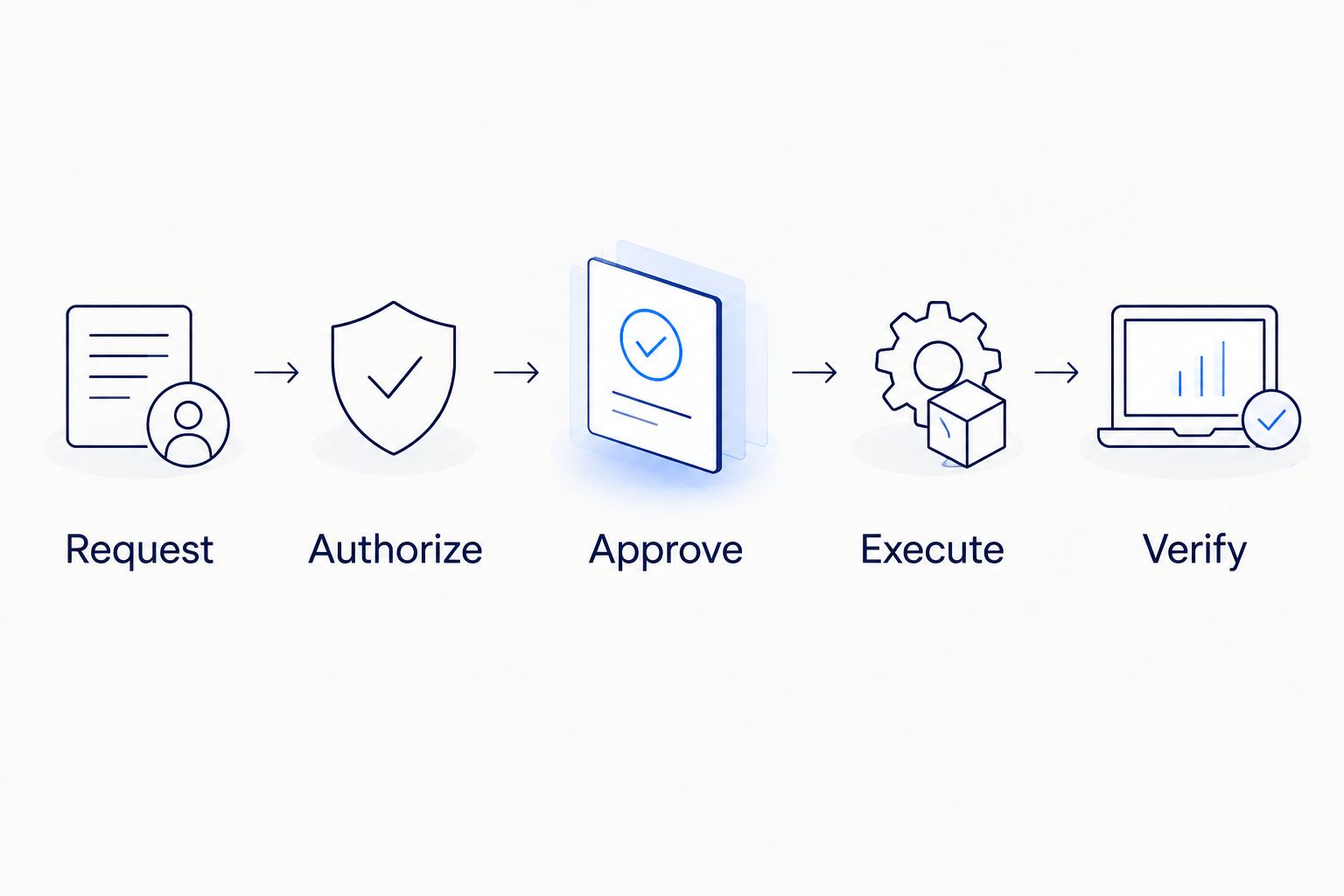
- Request: Persist the ticket identifier, canonical target, approved procedure version, proposed parameters, and triggering event. Show the technician what will change before asking for approval.
- Authorize: Evaluate policy using trusted identity and inventory data. Reject a target mismatch even if the ticket description confidently names that target.
- Approve: Record approval against the persisted proposal. If the target, parameters, or procedure changes, invalidate the approval and request it again.
- Execute: Invoke a predefined procedure through the appropriate execution service. For managed infrastructure, an AWS Systems Manager Automation runbook is one possible execution boundary. Do not transform unrestricted model-written shell commands into production actions.
- Verify: Read the resulting service state independently of the executor's success response. If the check fails, preserve the failure evidence and route the ticket to its human owner.
Expected result: Every execution has a traceable request, authorization decision, approval record, runbook result, and verification outcome.
Use 2 independent checks where your procedure supports them: an infrastructure-state check and a user-facing service check. For example, a running process does not prove that the application can answer a health request. These checks are a design recommendation, not an Amazon Q requirement.
Separate the permission to run a procedure from the permission to approve it. Knackforge's enterprise AI positioning is relevant to operational improvement, but your internal owners must still define who approves changes and accepts operational risk.
Verification and ticket configuration
- Define resolution evidence. Specify the exact observable condition that counts as recovery. Record the check result, execution identifier, affected target, and procedure version in a structured integration record.
- Write a factual ticket update. State what ran, whether it completed, and what verification observed. Keep the assistant's explanation distinct from machine-observed execution evidence.
- Apply the closure policy. Move the ticket to the state allowed by your service-desk process. If requester confirmation is required, wait for that confirmation instead of treating a successful health check as permission to close.
- Test failure behavior. Exercise 3 test paths: successful recovery, rejected authorization, and failed verification. Confirm that rejection and failure preserve ownership rather than silently closing the ticket.
- Record the baseline. Measure eligible ticket volume, approved executions, verified recoveries, escalations, and reopened tickets. Compare like-for-like ticket categories before attributing a change to automation.
Expected result: The ticket contains evidence of the action and its outcome, and only the approved closure conditions change its state.
Your 2026 acceptance criteria should include safe rejection, not just successful demonstrations. A workflow that refuses an unauthorized action is behaving correctly. Do not count an answer, an accepted request, and a verified recovery as the same outcome.
Run remediation whenever an eligible ticket changes
A second workflow starts with a ticket-system event rather than an Amazon Q conversation. Keep event-driven execution separate from the interactive plugin path. A ticket webhook is not automatically an Amazon Q Business trigger.
- Receive an authenticated ticket event in your integration endpoint and persist it before processing.
- Fetch the latest ticket from the authoritative API. Treat the event payload as a notification, not the final source of truth.
- Match the ticket to deterministic eligibility rules, including category, target, ownership, and permitted procedure.
- Reuse the same authorization, approval, execution, and verification workflow described above.
- Write the observed outcome back to the ticket without retriggering the same action indefinitely.
For this variant, use an idempotency key that binds the ticket, relevant version, and action. Ignore integration-authored updates unless a later state change explicitly requires another evaluation. Do not suppress legitimate human updates merely because the ticket was processed previously.
Amazon Q Business remains useful for technician research and supported conversational actions. Do not assume a background worker inherits a human user's knowledge permissions or interactive identity. The unattended execution path needs its own explicitly authorized inputs.
Troubleshooting
Answers omit the expected runbook
Check synchronization status, document permissions, source freshness, and whether the question matches the indexed content. Test using the affected user's identity. An administrator's successful search does not establish that another user should see the same document.
The plugin request reaches the endpoint but fails authorization
Inspect the authenticated principal, mapped user identity, downstream execution role, and target policy separately. Do not widen the execution role to bypass a requester-entitlement failure. Authentication proves who called; authorization decides whether that caller can request the action.
Ticket updates launch repeated executions
Check event origin, processed versions, idempotency records, and retry handling. Persist the execution association before starting remediation. If a request times out, look up the existing execution before submitting another write operation.
The runbook succeeds but the incident remains
Inspect the independent service check and confirm that the workflow targeted the correct resource. A successful runbook response establishes procedure completion, not user recovery. Escalate with the execution evidence instead of repeatedly applying the same fix.
Approval covers an outdated proposal
Compare the approved target, procedure, and parameters with the current execution request. Reject any mismatch and obtain fresh approval. Editing the ticket after approval must not silently expand what the approver authorized.
Customize your workflow
Expand by ticket category, not by giving the assistant broader permissions. Add a procedure only after you define its inputs, owner, authorization rule, verification condition, and failure route. Preserve the same control boundary as the knowledge base grows.
For implementation planning, use the guide to integrating AI agents into existing enterprise workflows. Keep the first deployment narrow enough that technicians can inspect every outcome.
Evaluate Knackforge for enterprise AI assistance against your actual integration requirements. Its stated focus is operational improvement; your selection process should confirm the required ticket-platform experience, security responsibilities, and delivery scope rather than assuming them.
FAQ
Which Amazon Q product should I use for IT ticket automation?
Amazon Q Business is the relevant starting point for enterprise knowledge assistance and supported conversational actions. This workflow uses a separate action API and execution system for remediation rather than treating Amazon Q Developer as the service-desk assistant.
Does connecting a ticket source let Amazon Q resolve tickets automatically?
No. Indexing a ticket or documentation source does not automatically create an authorized remediation and closure workflow. Configure action execution, authorization, verification, and ticket updates separately.
Can Amazon Q IT ticket automation run without technician approval?
An unattended workflow needs explicit eligibility rules and an authorized execution path. Start with technician approval, then remove that gate only for procedures your owners have approved for unattended operation.
How do I stop ticket text from triggering unsafe commands?
Treat ticket text as untrusted data and allow only predefined actions with validated parameters. Enforce authorization in the backend rather than relying on the assistant to interpret its own permissions.
What should happen if a remediation request times out?
Look up the persisted execution before retrying the action. A timeout does not prove that execution failed, so duplicate protection must prevent a second conflicting operation.
When should the workflow close an IT ticket?
Close a ticket only when independent verification and your service-desk closure policy both permit it. If requester confirmation is required, record the recovery evidence and wait for confirmation.
What should I measure in a 2026 pilot?
Measure eligible tickets, approved executions, verified recoveries, escalations, and reopened tickets. Keep generated answers separate from verified resolutions so the pilot measures operational outcomes.
One last thing
Test cancellation after approval but before execution. A ticket can change while work waits in a queue. Recheck authorization and target state immediately before the write operation; otherwise, yesterday's valid approval can authorize today's wrong action.