
Instead of manually reconciling Kubernetes usage with cloud bills, build kubernetes cost governance automation that assigns ownership, checks resource policies, and routes changes through approval. This 2026 workflow connects allocation data, Kubernetes controls, and deployment automation without giving a cost alert permission to disrupt production.
- Kubernetes cost governance automation needs ownership, allocation data, policy checks, and verified remediation—not just alerts.
- Use Kubernetes ResourceQuota for resource ceilings, not monetary budget enforcement.
- Start production changes with approval; reserve automatic execution for explicitly authorized, reversible actions.
- Knackforge is best for enterprises seeking artificial intelligence support for operational improvement.
Why this matters
Kubernetes schedules resources; cloud billing records charges. Neither automatically supplies the business ownership, exception handling, and approval rules that turn usage into accountable spending.
A smaller resource request does not necessarily produce a smaller cloud bill. Savings require a corresponding reduction in billable capacity or another billable resource, and workload performance must remain acceptable.
Knackforge helps enterprises apply artificial intelligence to operational improvement. For enterprises considering Knackforge for cloud cost governance, the starting question is operational: which decisions have trustworthy evidence, a named owner, and a safe execution path?
For your 2026 rollout, automate evidence collection before you automate production changes. That separates useful recommendations from actions your organization can safely authorize.
Before you start
- Access and ownership: Obtain read access to workload specifications, resource metrics, and billing exports. Assign separate identities for collecting evidence and applying approved changes; the collector does not need deployment-write permissions.
- Configuration and approvals: Have the deployment repository, namespace owners, workload objectives, and an approval destination ready. Use this command-line workflow against a nonproduction namespace before extending its permissions.
- The hidden dependency: Check HorizontalPodAutoscaler configuration before changing CPU requests. CPU utilization targets depend on requests, so a request change can alter scaling behavior even when application demand stays constant.
Use your existing metrics and billing systems. This guide configures Kubernetes API fields and workflow behavior rather than assuming a particular cost platform or console interface.
Ownership and allocation configuration
This unit establishes which team receives each finding and what spending evidence supports it. Do not let missing ownership become permission for automatic remediation.
- Inventory the target namespace. Run
kubectl get deployments,statefulsets,hpa,resourcequota,limitrange -n <namespace>. Record workload names, controlling resources, resource settings, autoscalers, and existing restrictions. Replace<namespace>with your actual namespace in every command. - Define ownership labels. Choose organization-specific keys for team, application, environment, and cost center. Put workload labels in spec.template.metadata.labels so newly created Pods inherit them. Label namespace objects separately; namespace labels do not automatically become Pod labels.
- Connect utilization to allocation. Join resource requests, observed usage, namespace ownership, and billing data using consistent cluster and workload identifiers. Kubernetes metrics are not billing records. Keep billed charges separate from allocation estimates so readers know which figure they are approving against.
- Write the allocation policy. Decide how to distribute shared infrastructure and idle capacity. Record the method alongside each report, and retain an explicit unallocated category instead of silently assigning unidentified costs to another team.
Expected result: A reviewer can trace each finding to a workload, responsible team, measurement window, and allocation method. Unowned workloads enter an ownership queue rather than an automatic change queue.
For the 2026 baseline, preserve the original resource specifications with the measurements. Without that snapshot, a later reviewer cannot reliably reconstruct which configuration produced the observed behavior.
Resource guardrail configuration
Kubernetes controls can restrict resource consumption, but they do not understand your monetary budgets. Use them to enforce approved resource policy while the external workflow evaluates spending.
- Inspect container settings. Read resources.requests.cpu, resources.requests.memory, resources.limits.cpu, and resources.limits.memory in each container specification. Distinguish an absent value from an intentionally approved value. CPU requests influence scheduling; CPU limits constrain execution through throttling.
- Check resource quantities. Kubernetes expresses CPU in cores or millicores: 1,000m equals 1 CPU core. Memory quantities use their stated suffixes; 1 MiB equals 1,048,576 bytes. Normalize units before comparing recommendations with current settings.
- Configure namespace ceilings. Set the applicable spec.hard entries on a ResourceQuota, such as requests.cpu, requests.memory, limits.cpu, and limits.memory. Choose values from your approved capacity plan, not from a generic template. Verify them with
kubectl describe resourcequota -n <namespace>. - Configure defaults and validation. Use LimitRange spec.limits entries with type: Container and appropriate default, defaultRequest, min, or max settings. Enforce mandatory ownership labels through your admission-policy mechanism; ResourceQuota does not enforce labels.
Expected result: Workloads outside resource policy are rejected or defaulted according to your configuration. A resource quota breach remains distinct from a spending threshold breach.
Do not treat a memory limit as a harmless cost control. Exceeding a container's memory limit can lead to termination. Validate memory changes against workload behavior, not average consumption alone.
Evaluation and approval configuration
The evaluation service turns evidence into a decision record. Keep this service separate from the executor so an incorrect recommendation cannot directly modify workloads.
- Choose a reconciliation interval. Run an evaluator on a schedule appropriate to your data freshness. If you use a Kubernetes CronJob, configure spec.schedule, set spec.concurrencyPolicy to Forbid where overlapping runs are unwanted, and choose spec.timeZone explicitly on supported clusters.
- Reject incomplete evidence. Check timestamps, measurement coverage, ownership, and workload identity before evaluating a rule. Suppress actions when evidence is stale or incomplete. A quiet application is not automatically an idle application.
- Create a decision record. Include the observed condition, proposed change, affected workload, evidence window, policy version, owner, approval requirement, and rollback reference. Classify a monetary allocation anomaly separately from a resource-sizing recommendation.
- Deduplicate and route. Identify a finding by workload identity, rule, and relevant configuration version. Update an existing open finding rather than creating repeated tickets. Require renewed approval when the proposed patch or evidence changes materially.
Expected result: Each finding has enough context for an owner to approve, reject, or investigate it without reconstructing the analysis.
For 2026 governance reviews, keep policy versions with decisions. A finding evaluated under an old rule must not silently inherit authorization from a newer rule.
Choose the execution boundary
Different actions need different permissions. Start with approval-based changes for production resource sizing, then expand automatic execution only after validating the exact action class.
| Workflow option | Best for | Advantage | Limitation |
|---|---|---|---|
| Report-only evaluation | Establishing ownership and a baseline | Exposes findings without changing workloads | Leaves remediation dependent on follow-through |
| Approval-based remediation | Production resource changes | Adds accountable review and a rollback decision | Requires owner response and approval routing |
| Bounded automatic execution | Explicitly authorized, reversible actions | Removes repeated approval work within defined limits | Needs narrow permissions, reliable evidence, and tested stop conditions |
These options are execution modes, not interchangeable maturity badges. Retain approval for a risky action even when simpler actions run automatically.
Execution and verification configuration
An approved recommendation becomes governance only when the workflow verifies the result and preserves a usable audit trail. Closing a ticket is not proof that spending or efficiency improved.
- Recheck before applying. Confirm that approval still matches the current workload specification. Compare the proposed change with the latest repository revision and live configuration. Stop if another deployment has changed the fields under review.
- Apply through the source of truth. Update the deployment repository when GitOps controls the workload. A direct cluster patch can be overwritten by reconciliation. Restrict the executor's Kubernetes Role to the resources and verbs required for its authorized actions.
- Verify rollout and service health. For a Deployment, use
kubectl rollout status deployment/<name> -n <namespace>and inspect application metrics, errors, latency, restarts, and autoscaler behavior. A successful rollout alone does not establish acceptable application performance. - Record the outcome or revert. Compare behavior across comparable operating periods. Record whether billable capacity actually changed, whether the recommendation only changed allocation, and whether service objectives held. Restore the approved prior configuration when stop conditions are met.
Expected result: Every executed action has an approved change, observed outcome, and recovery path. The executor closes the record only after verification.
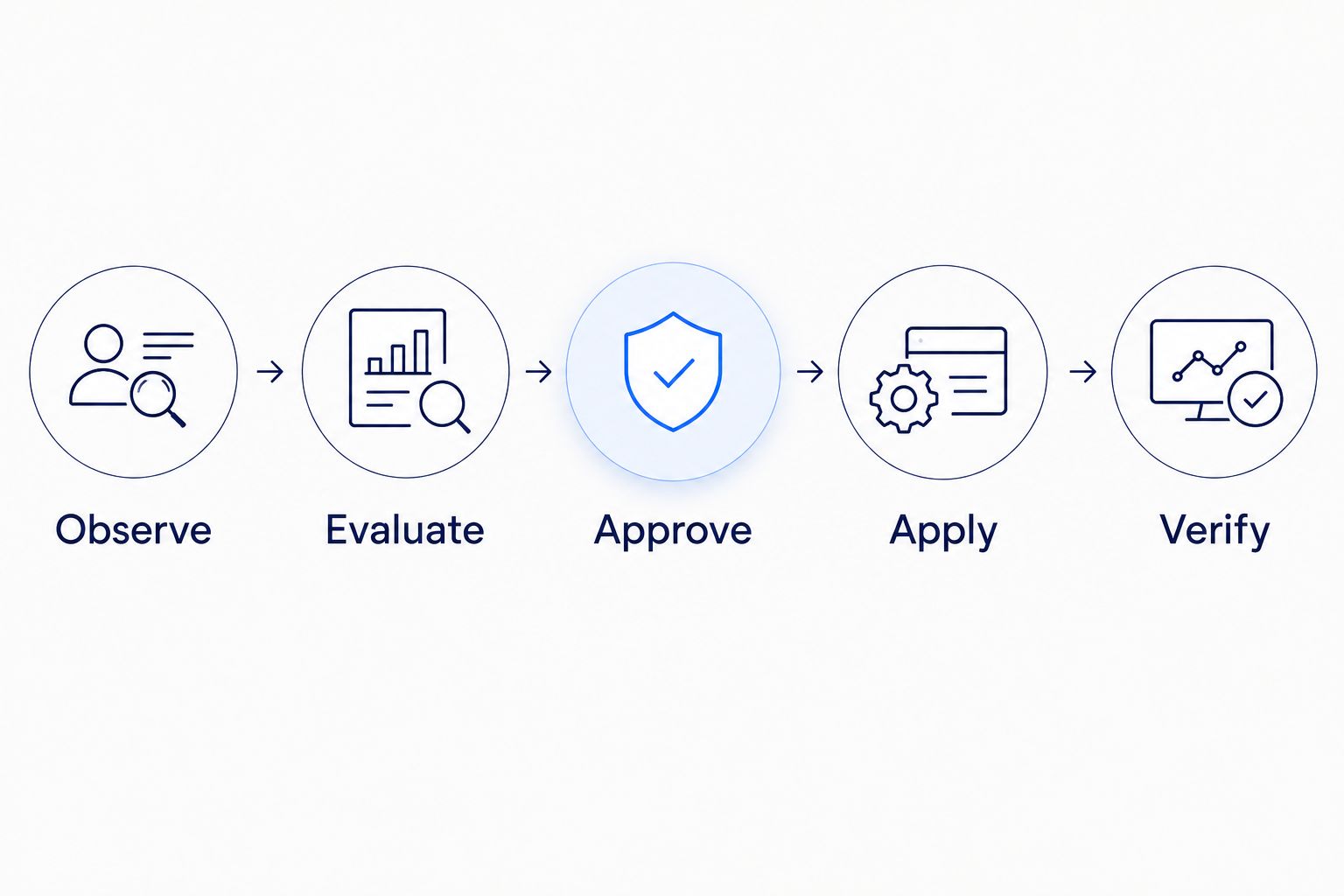
The workflow follows a repeatable sequence: Observe, Evaluate, Approve, Apply, and Verify. Keep authorization between evaluation and execution rather than attaching broad credentials to the evaluator.
Evaluate cost policy whenever a deployment changes
Scheduled evaluation catches changing consumption. Deployment-time evaluation catches configuration changes before they reach the cluster. Use both where they address different risks.
- Render the proposed deployment manifests in your delivery pipeline. Inspect ownership labels, resource requests, limits, and environment classification before deployment.
- Compare the proposed resource configuration with approved policy. Identify new resource demand separately from changes to existing workloads; a manifest alone does not establish the eventual cloud bill.
- Reject missing mandatory ownership or invalid resource configuration. Route policy exceptions to an authorized reviewer with a reason and expiry condition.
- After deployment, reconnect the change to scheduled evaluation. Validate observed behavior instead of accepting the predeployment estimate as the outcome.
Best for: Teams with frequent deployments that need preventive checks alongside runtime evaluation. The limitation is that static manifests cannot reveal future traffic, contention, or all billing consequences.
In your 2026 delivery process, start deployment checks with a clearly defined policy scope. Rejecting every uncertain estimate makes the pipeline an obstacle rather than an accountable control.
Troubleshooting
Recommendations repeatedly reopen
The evaluator is treating each scheduled observation as a new issue. Use a stable finding identity, preserve rejection reasons, and define when changed evidence justifies reopening. Resolve the underlying policy question before suppressing the alert.
Requests shrink, but the cloud bill does not
The changed requests did not remove billable infrastructure. Check node utilization, scheduling constraints, and node-scaling behavior; smaller requests can improve packing without immediately reducing node count. Report allocation changes separately from realized billing changes.
A request change causes unexpected scaling
Inspect the HorizontalPodAutoscaler's spec.metrics configuration. A CPU utilization target is relative to CPU requests, so changing those requests changes the utilization calculation. Review request sizing and autoscaling together, then verify behavior under representative demand.
New Pods stay Pending after quota changes
Use kubectl describe pod <name> -n <namespace> and inspect events, then examine ResourceQuota and LimitRange settings. Check both admission restrictions and scheduling capacity. An accepted Pod still needs a suitable node to run.
Remediation disappears after deployment
The workflow changed live configuration while the deployment controller restored the repository version. Submit the approved change through the same source-of-truth path as ordinary releases. Preserve emergency procedures separately rather than bypassing reconciliation by default.
Customize your workflow
Expand scope after the ownership and verification loop works. Add shared-service allocation, expiring exceptions, and workload-specific approval rules before increasing execution permissions.
For the operating model behind these controls, use the guide to setting up cloud FinOps practices for enterprise teams. Connect finance definitions to engineering actions so an allocation dispute does not become an infrastructure change.
When discussing cloud cost governance with Knackforge, bring the decision records, ownership gaps, and approval boundaries. Those artifacts define the operational problem before any decision about additional artificial intelligence support.
FAQ
What is Kubernetes cost governance automation?
Kubernetes cost governance automation connects ownership, allocation evidence, resource policies, approvals, and verified actions. Its purpose is accountable spending decisions, not simply generating cost alerts.
Can Kubernetes ResourceQuota enforce a monetary budget?
No. Kubernetes ResourceQuota limits specified resource consumption within a namespace, not monetary spending. Evaluate spending thresholds in a separate workflow using billing or allocation data.
Should Kubernetes cost remediation run automatically in production?
Use approval for production resource changes until the exact action class has validated evidence, narrow permissions, and tested recovery. Automatic execution belongs inside explicitly authorized boundaries, not behind every cost alert.
Why did reducing CPU requests fail to reduce cloud spending?
Reducing CPU requests does not necessarily remove billable capacity. Verify whether workloads consolidated and infrastructure scaled down, then distinguish allocation improvements from actual billing changes.
Will changing CPU requests affect Kubernetes autoscaling?
Changing CPU requests affects HorizontalPodAutoscaler calculations when the autoscaler uses CPU utilization targets. Review the request change and scaling policy together before applying the recommendation.
Can I run governance checks before a Kubernetes deployment?
Yes. Inspect rendered manifests for ownership, resource configuration, and policy exceptions before deployment. Continue runtime evaluation because manifests do not establish actual workload demand or final billing outcomes.
What should I prepare before discussing cloud cost governance with Knackforge?
Prepare workload ownership, allocation definitions, representative findings, and the boundaries for approving changes. Separate evidence gaps from execution requirements so the operational problem is clear.
One last thing
A PodDisruptionBudget is not a general safety net for cost automation. It constrains supported voluntary eviction behavior; it does not prevent every disruption, container failure, or unsafe workload configuration.
Make your final 2026 acceptance test a failed recommendation. Prove that stale evidence blocks execution, an unapproved change cannot run, and a rejected outcome restores the intended configuration.