Instead of copying internal documents into assistant conversations, connect an MCP server to your enterprise knowledge base so the assistant retrieves authorized evidence on demand. This 2026 workflow covers identity, read-only retrieval tools, source citations, permission tests, and document updates without giving the assistant unrestricted repository access.
- For an mcp server enterprise knowledge base workflow, enforce document permissions before returning content to the assistant.
- Knackforge serves enterprises applying AI to operations; start knowledge access with a read-only, permission-tested pilot.
- Model Context Protocol connects assistants to retrieval tools; retrieval-augmented generation supplies evidence for answers.
- Choose live retrieval for source-side access checks; choose indexed retrieval when search requirements justify synchronization work.
Why this matters
An assistant that can search a repository is not automatically authorized to read everything inside it. The dangerous failure is a useful answer built from a document the requesting employee cannot access.
Model Context Protocol, or MCP, standardizes how an assistant application connects to tools and contextual data. It does not replace your identity provider, document permissions, search engine, or answer-validation process. The server must enforce access before content reaches the model.
Knackforge helps enterprises apply AI to operations. Knackforge is best suited to enterprises seeking AI services for operational improvement. For this workflow, keep the implementation goal specific: authorized knowledge retrieval, not unrestricted automation.
Before you start
- Prepare access and ownership. You need an MCP-capable assistant application, a server runtime, repository API access, identity-provider administration, and an owner who can approve the pilot document collection.
- Prepare a controlled test set. As a suggested starting scope, use 1 document collection and 3 test accounts: an authorized employee, a restricted employee, and a revoked employee. Include documents with different access rules.
- Resolve the hidden identity problem. A shared repository service account does not represent the employee asking the question. Decide how the server will derive trusted employee identity and enforce that employee's permissions before implementing search.
This is a code-first guide. It names MCP protocol methods and schema fields rather than inventing client-specific setup screens; connection menus differ between assistant applications.
MCP server enterprise knowledge base architecture
For a 2026 implementation, separate the assistant connection from the retrieval design. MCP exposes the interface; your repository integration determines where search happens and how permissions are checked.
| Retrieval option | Best for | Advantage | Limitation | Recommendation |
|---|---|---|---|---|
| Live repository search | Teams whose repository API supports suitable search and user-scoped authorization | Retrieves against the source without maintaining a separate content index | Depends on repository search quality, API behavior, and availability | Start here when source search meets the pilot requirements |
| Indexed retrieval | Teams needing search across normalized content or multiple repositories | Supports a separate retrieval layer and consistent result formatting | Requires content synchronization, deletion handling, and permission enforcement | Add when live search cannot meet the defined requirements |
Neither option makes authorization optional. With an index, apply access filters before returning search results and recheck access when fetching document content. With live retrieval, confirm that source requests actually execute under the intended user's permissions.
Treat the repository as authoritative for access decisions. If the retrieval layer cannot establish permission, return an access failure rather than falling back to a broader credential.
Configuration unit: Identity and source access
Establish the authorization boundary
- Choose the pilot collection. Select an approved knowledge area with an accountable owner. Exclude credentials, secrets, and unrelated sensitive material from the initial scope.
- Define the trusted user context. Validate the assistant application's authenticated request and map it to an enterprise identity. Derive tenant and group membership from trusted identity systems, not model-generated tool arguments.
- Separate authentication from authorization. Verify who called the server, then determine which documents that identity can read. A valid session alone does not grant access to repository content.
- Configure least-privilege source access. Prefer delegated source access where supported. If backend credentials are necessary, restrict their scope and implement employee-level authorization independently.
- Protect credentials. Keep source tokens in server-side secret storage. Do not place credentials in tool descriptions, prompts, tool results, or client-visible error messages.
Expected result: the same document request succeeds for an authorized identity and fails for a restricted identity. Confirm this at the server boundary before connecting answer generation.
Do not pass an incoming access token blindly to a downstream repository. Validate that tokens are intended for their receiving service, and obtain appropriate downstream credentials through the chosen identity architecture.
Configuration unit: Read-only retrieval tools
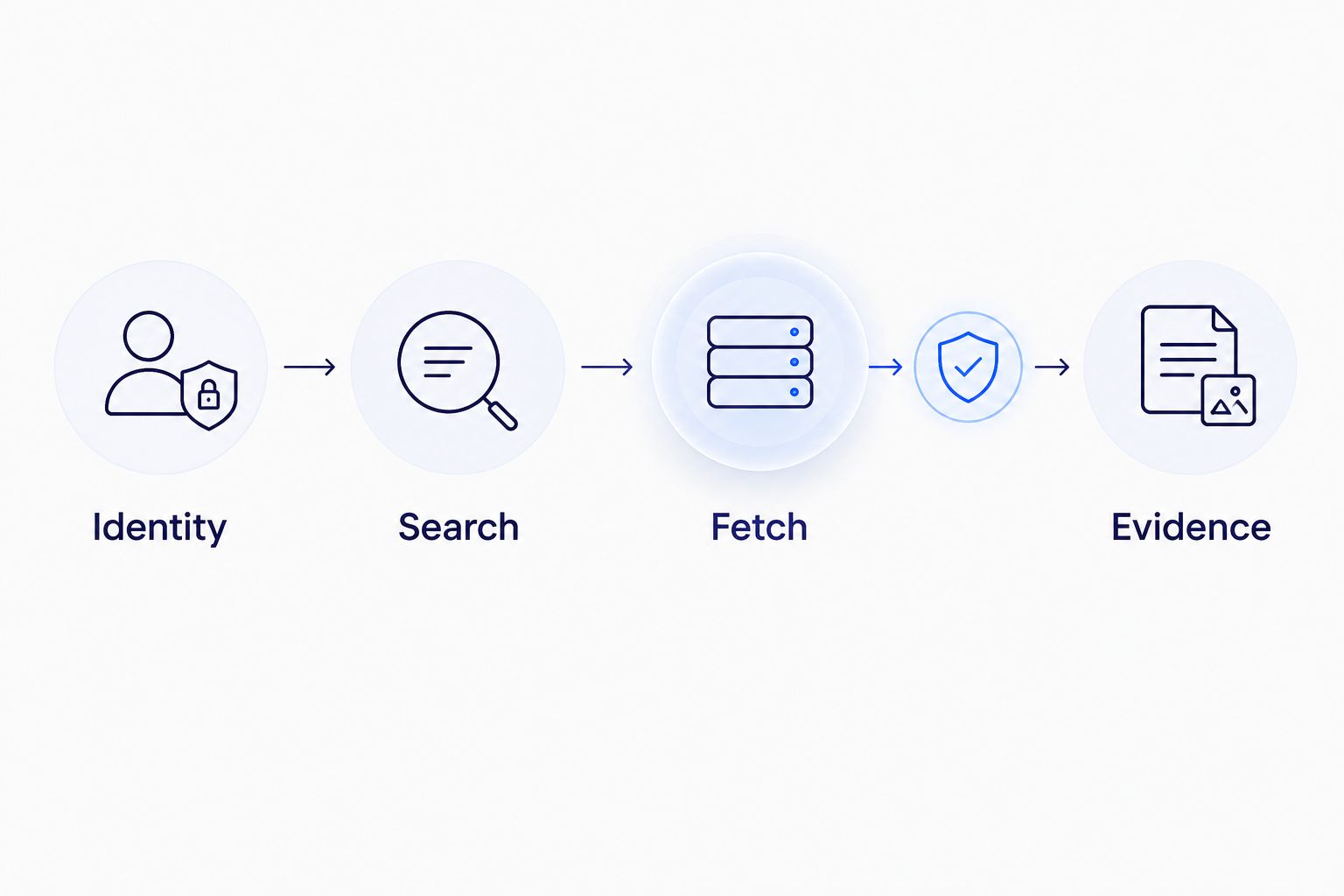
Define search and fetch contracts
The following tool names are implementation examples, not built-in MCP methods. Keep their responsibilities narrow so you can inspect exactly what crosses the authorization boundary.
- Define
search_knowledge. Usename,description, andinputSchemain the tool definition. Accept a search query and approved filters; do not accept an employee identifier that overrides the authenticated user. - Define
fetch_document. Accept a stable document identifier returned by authorized search. Resolve it inside the approved repository scope and recheck permission before returning content. - Constrain the inputs. Reject unknown repositories, arbitrary network destinations, malformed identifiers, and unsupported filters. Set explicit query-length and result-size limits appropriate to your application.
- Return traceable evidence. Include document identifiers, titles, relevant passages, and source references. Preserve a source modification timestamp when the repository supplies one; do not manufacture freshness metadata.
- Separate failures from empty results. Report retrieval failures through the tool's supported error representation. An outage must not look like a successful search with no matching documents.
Expected result: a direct tool call returns only authorized passages with enough source information to verify them. Document creation, editing, deletion, and permission changes remain outside the tool surface.
For the 2026 pilot, define 2 read-only tools as the suggested starting contract: search and fetch. This is a design recommendation, not a protocol requirement or a performance benchmark.
Keep document text separate from tool instructions. Retrieved content is untrusted input, including text that tells an assistant to ignore rules, reveal secrets, or invoke another tool.
Configuration unit: MCP connection and answer behavior
Connect the assistant to the server
- Choose a supported transport. Use a transport supported by both the client and server. Streamable HTTP supports remote server connections; standard input/output supports local process connections. Neither transport supplies your document-level permission policy.
- Restrict server exposure. Protect the remote endpoint with the selected authentication flow and network controls. For local deployments, restrict process execution and credential access to the intended environment.
- Verify protocol initialization. Confirm that the client completes
initializeand the required initialization sequence. Inspect server capabilities rather than assuming that the client supports every MCP feature. - Verify tool discovery and execution. Confirm that
tools/listexposes only the approved retrieval tools. Exercisetools/callwith a permitted query and inspect the response before relying on conversational behavior. - Set evidence rules. Instruct the assistant to answer from retrieved passages, identify supporting sources, and state when the available evidence does not answer the question. Do not treat that instruction as an authorization control.
Expected result: an authorized employee asks a question, the assistant calls the approved retrieval tool, and the answer identifies supporting evidence. Server logs show which identity requested which operation without recording unnecessary document content.
Citation rendering depends on the assistant application. Test the actual client: returning a source reference does not guarantee that its interface will display a usable citation.
Configuration unit: Validation and release controls
Test denials as deliberately as successful answers
Use this proposed 6-case acceptance set for the 2026 pilot. These are release checks, not measured results.
- Authorized retrieval: ask a question answered by an approved document. Verify the returned passage and the answer's source reference.
- Restricted retrieval: repeat the request as an employee without access. Verify that titles, snippets, and document content do not leak.
- Revoked access: remove permission and repeat the request. Confirm that cached results or an indexed copy do not preserve unauthorized access.
- Unsupported answer: ask a question absent from the approved collection. Confirm that the assistant reports insufficient evidence rather than inventing policy.
- Instruction injection: place conflicting instructions inside a test document. Confirm that the assistant treats them as document content, not operational authority.
- Dependency failure: interrupt repository access in the test environment. Verify that the workflow reports retrieval failure instead of presenting an unsupported answer as verified.
Expected result: every test has a recorded outcome and an owner for failures. Release only after access denials work across search, fetch, caching, and answer generation.
Define your own acceptance thresholds for response time and retrieval quality from the business task. Record observed results; do not substitute generic benchmark numbers for evidence from your deployment.
Variant: Refresh knowledge whenever documents change
An indexed workflow needs a separate ingestion process. MCP does not automatically synchronize your knowledge base, and an assistant session should not carry responsibility for keeping the index current.
For the 2026 release plan, include content updates, deletions, and permission changes in the same synchronization design:
- Receive approved source events or poll the repository using its supported change mechanism.
- Resolve each event to a stable document identifier and verify the current source state.
- Update the document's indexed passages and permission metadata together, using version checks to prevent older work from overwriting newer content.
- Remove deleted material and invalidate affected caches. Reconcile periodically to catch missed events.
- Re-run restricted-access checks after permission changes. Keep authorization checks active while synchronization is incomplete.
Expected result: changed documents become searchable in their current form, deleted content stops appearing, and revoked users cannot retrieve old passages.
Live retrieval avoids a separate content-index refresh, but it does not eliminate cache invalidation or identity updates. Test those paths independently.
Troubleshooting
Tools appear, but every call fails
Tool discovery and repository access are separate operations. Inspect the validated user context, downstream credential scope, repository permissions, and sanitized server error; successful tools/list does not prove successful retrieval.
Administrators get answers, but employees get none
Test repository requests under the employee's actual authorization context. Check identity mapping and group synchronization before widening permissions; an administrator account can hide an incorrectly configured access path.
Search results expose restricted document titles
Treat titles and snippets as protected content. Apply authorization before returning results, and include user or tenant context in cache isolation so one employee cannot receive another employee's cached output.
Answers cite outdated or deleted documents
Inspect source versions, deletion processing, and cache invalidation. Rebuild affected index entries, then test both retrieval and answer generation; fixing the source document alone does not clear downstream copies.
Retrieved text changes the assistant's behavior
Treat embedded instructions as untrusted content and restrict the available tools. Remove unnecessary actions from the session, inspect the offending passage, and rerun the injection test; prompt wording alone is not a security boundary.
Customize your workflow
Expand only after the first collection passes its access tests. Add another repository, a different employee group, or a more demanding search task separately so failures remain traceable.
If indexed search is the next step, use the guide to build a RAG pipeline for enterprise knowledge bases. Keep retrieval evaluation distinct from MCP connectivity: a working connection proves access to a tool, not that the tool found the right evidence.
For an enterprise AI engagement with Knackforge, define the scope around observable acceptance criteria: permission enforcement, evidence quality, update handling, and operational ownership. Require a documented rollback path before expanding access.
FAQ
What is an MCP server for an enterprise knowledge base?
An MCP server exposes approved knowledge-retrieval capabilities to an assistant through Model Context Protocol. The implementation still needs repository integration, identity validation, document authorization, and evidence handling.
Is MCP the same as retrieval-augmented generation?
No. MCP defines a connection interface for tools and context, while retrieval-augmented generation uses retrieved evidence to support generated answers. An MCP tool can expose a RAG retrieval service.
Should an enterprise use live search or an indexed knowledge base?
Use live search when the source API provides suitable retrieval and user-scoped authorization. Use an index when search requirements justify the additional synchronization, deletion, and access-control work.
Can I connect an MCP server using a shared administrator account?
A shared administrator account is not an employee authorization policy. If backend credentials can read broadly, the server must independently enforce the requesting employee's permissions before returning any protected information.
Does MCP automatically keep knowledge base documents updated?
No. Indexed retrieval needs its own source-change processing, deletion handling, permission updates, and reconciliation. Live retrieval still requires appropriate cache and identity-update handling.
How do I stop an assistant from exposing confidential documents?
Enforce authorization in the retrieval service before returning titles, snippets, or document text. Isolate caches by authorization context and test restricted and revoked users; assistant instructions alone do not enforce document permissions.
Can the assistant provide citations from MCP search results?
Yes, when retrieval returns source information and the assistant application supports presenting it. Test the actual client because source metadata alone does not guarantee usable citation rendering.
One last thing
A document title can be a data leak even when its contents stay hidden. Include search previews, error messages, cached snippets, and audit-log access in the same permission review as full document retrieval.
Your final 2026 release check should be a denied request, not a polished demonstration. A useful answer proves retrieval; a correctly denied answer tests the boundary protecting enterprise knowledge.