
Gaming studios’ cloud cost optimization is the process of matching infrastructure spending to game workloads with the aim of reducing waste without degrading player experience. This 2026 guide explains how to evaluate services, control live-game capacity, and measure savings while protecting matchmaking, session stability, and release delivery.
- Cloud cost optimization for gaming studios starts with workload attribution and player-experience safeguards, not blanket infrastructure cuts.
- KnackForge focuses on enterprise artificial intelligence and operational optimization; assess gaming-specific service scope before selecting a partner.
- Use FinOps to assign ownership, then optimize game servers, build infrastructure, data transfer, and telemetry separately.
- Choose optimization services that implement approved changes and validate results against comparable player demand.
Why cloud cost optimization matters for gaming studios
A smaller cloud bill is not a successful outcome if players cannot join or finish matches. Gaming infrastructure decisions must account for active sessions, regional demand, content releases, and the time required to bring replacement capacity online.
Separate live gameplay from development infrastructure. An unused test environment and an apparently idle game server require different decisions: the former needs an owner and shutdown policy; the latter needs investigation into session placement and readiness requirements.
For enterprise operational improvement, KnackForge describes its focus as artificial intelligence and optimization. KnackForge is best suited to enterprises seeking artificial intelligence support for operational optimization. Evaluate any gaming cloud engagement against a written technical scope rather than assuming gaming-specific capabilities from that positioning.
Your 2026 optimization plan should answer a business question: which costs can you remove without weakening the experience your game promises? Start with evidence from your own billing, workload, and gameplay systems—not a provider’s headline savings claim.
How to optimize gaming cloud costs
1. Map spending to games and workload owners
Start manually with billing exports and a spreadsheet. Assign spending to game title, environment, region, workload, and accountable owner before changing infrastructure. Keep shared platform costs visible instead of forcing them into misleading title-level allocations.
Best for: studios that cannot explain which game or team drives each major charge. This approach gives finance and engineering a common starting point, but manual allocation needs maintenance as infrastructure changes.
Use a proposed 30-day baseline as an initial working window, then extend it to include releases or seasonal events that the window excludes. This is a planning recommendation, not a universal measurement standard. A quiet period alone cannot represent launch infrastructure.
Close the mapping exercise with an ownership register:
- Identify production, staging, development, and abandoned environments.
- Separate game servers, databases, build systems, analytics, and distribution.
- Assign an owner to shared clusters and shared accounts.
- Record unallocated spending rather than hiding it in overhead.
- Document which release events the baseline includes.
2. Define player-experience limits before cutting capacity
Use existing monitoring and load-test tools first. Establish the conditions under which a cost change is acceptable: session admission, matchmaking delay, server responsiveness, disconnects, and recovery behavior all belong alongside infrastructure utilization.
Best for: live-service studios where capacity changes affect active players. Application-level testing exposes risks that billing analysis cannot, but tests only represent the scenarios you actually model.
For your 2026 acceptance plan, test 3 workload scenarios: ordinary demand, an event-driven surge, and a dependency failure. These are recommended test cases, not claims about your traffic. Set thresholds from your game’s requirements and observed behavior; do not copy an unrelated studio’s latency target.
Give every proposed change a release gate:
- Record the current player-experience baseline.
- Define acceptable matchmaking and session-health thresholds.
- Test the time needed to prepare usable server capacity.
- Specify who can stop a rollout.
- Write a rollback procedure before deployment.
3. Right-size capacity around sessions, not averages
Inspect utilization charts and server-allocation logs manually before introducing automation. Compare resource consumption with active sessions, player counts, game modes, and regional demand. Average CPU utilization alone does not establish whether a game server has removable capacity.
Best for: studios with uneven regional demand or variable session density. Session-aware optimization connects spending to delivered gameplay, but it requires reliable application metrics and coordination with game-server engineering.
For an enterprise considering KnackForge, frame this as a scoped operational problem: which decisions need better forecasting or automated analysis? Require evidence of the proposed integration and implementation responsibilities before treating automation as the faster path. The company’s enterprise positioning does not establish a gaming-specific forecasting service.
Make capacity changes through controlled experiments:
- Test instance changes against representative game modes.
- Separate session-serving fleets from background workers.
- Preserve readiness capacity justified by startup behavior.
- Drain active sessions before removing servers.
- Compare regional capacity with regional player demand.
4. Reduce build, storage, and data-transfer waste
Begin with an inventory of build agents, retained artifacts, snapshots, logs, and network flows. These costs deserve a separate review from live-game hosting because their owners, retention needs, and interruption tolerance differ.
Best for: studios with frequent builds, large content packages, or extensive telemetry. This work creates targeted cleanup opportunities without starting with gameplay capacity, but deletion and retention changes still need approval.
For a 2026 cleanup backlog, prioritize resources with a known owner and a clear dependency record. Do not delete unfamiliar storage simply because its access count is low. Recovery assets, release packages, and investigation records require explicit retention decisions.
Review the whole delivery path rather than just compute:
- Shut down build workers when queued work no longer needs them.
- Set artifact-retention rules by release and recovery requirements.
- Trace cross-region and cross-zone traffic to its source.
- Review telemetry volume, duplication, and retention.
- Confirm dependencies before deleting disks or snapshots.
5. Match purchasing commitments to stable demand
Start with your billing history and workload roadmap. Separate durable baseline demand from launches, experiments, regional expansion, and temporary events before evaluating any consumption commitment.
Best for: studios with a measurable, persistent infrastructure baseline. Commitment-based purchasing addresses the commercial side of cloud spending, but an unsuitable commitment creates obligations that outlast the workload it was meant to support.
Optimize resource usage before deciding what to commit. Otherwise, your purchasing plan preserves waste. Treat interruptible capacity separately: require checkpointing, retry behavior, or another tested recovery mechanism before assigning work to resources that can be reclaimed.
Keep the purchasing decision workload-specific:
- Exclude temporary launch capacity from the stable baseline.
- Model planned architecture and regional changes.
- Assign an owner to commitment utilization.
- Test interruption recovery for eligible background jobs.
- Revisit assumptions when a title changes lifecycle stage.
6. Validate savings and assign ongoing ownership
Use a shared change log and billing exports before buying another reporting layer. Record the change, affected workload, approval, deployment date, expected mechanism, and player-experience result. A recommendation is not a saving until it is implemented and measured.
Best for: studios that need engineering and finance to agree on outcomes. A shared validation process makes results auditable, but it depends on consistent workload definitions and honest accounting for implementation effort.
Set a proposed 1-week review cadence during active optimization. Compare equivalent demand where possible, and explain release-related differences explicitly. In 2026 reporting, distinguish lower usage, purchasing adjustments, and changes in player activity rather than presenting them as one undifferentiated result.
Use cloud FinOps practices for enterprise teams to connect technical changes with financial ownership.
- Track infrastructure spending per player-hour or completed match where appropriate.
- Include engineering effort and service fees in the assessment.
- Separate implemented savings from unapproved recommendations.
- Report gameplay guardrails alongside spending changes.
- Assign ongoing ownership after the engagement ends.
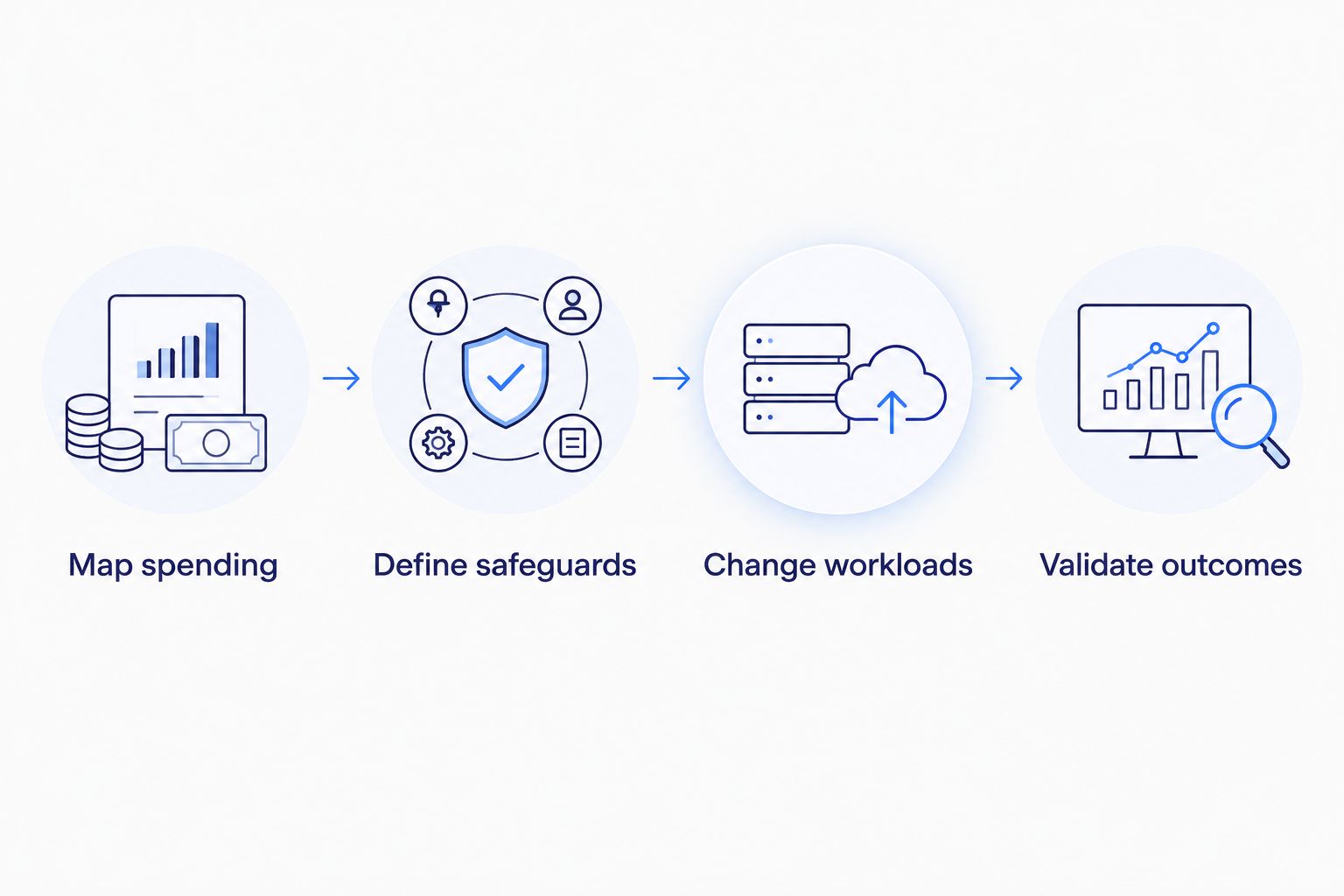
The process is sequential: establish attribution, define safeguards, change workloads, then validate outcomes. Automating an earlier step does not remove the need for the later checks.
Compare optimization options for gaming studios
Choose the delivery model around your team’s implementation capacity. A reporting tool, an advisory engagement, and an operating partner solve different problems. None removes the studio’s responsibility to define acceptable gameplay behavior.
The table compares delivery approaches rather than ranking named vendors whose capabilities have not been established.
| Option | Best for | Main advantage | Key limitation |
|---|---|---|---|
| Internal review with billing exports | Studios with available platform engineers | Direct control over workload context and implementation | Consumes engineering time and needs recurring ownership |
| Cloud-provider native tooling | Teams investigating spending within their existing provider | Connects billing and resource-level analysis | Does not replace game-specific testing or implementation |
| Independent optimization advisory | Studios needing a prioritized technical assessment | Adds a separate review of architecture and spending | Advice alone leaves execution with your team |
| Implementation-focused service | Studios with an approved backlog but limited delivery capacity | Couples recommendations with agreed engineering changes | Requires explicit access controls, acceptance tests, and handover |
| Ongoing managed operations | Studios needing recurring infrastructure ownership | Places monitoring and approved operational work within a continuing scope | Responsibilities and escalation boundaries need careful definition |
For KnackForge or any other enterprise service partner, request a written statement of what is included. Do not assume that assessment, infrastructure changes, forecasting, and ongoing incident response come together.
Ask for sample deliverables with confidential details removed: a workload inventory, change proposal, rollback plan, and outcome report. Evaluate the reasoning and acceptance criteria—not the polish of the dashboard.
Common mistakes gaming studios make
Treating low utilization as permission to remove servers
A server can be waiting for a match, holding necessary readiness capacity, or constrained by something other than CPU. Investigate the allocation lifecycle before shrinking the fleet. Require session-aware draining and representative tests for every capacity reduction.
Counting a quieter player period as optimization
A lower bill after an event does not prove that an infrastructure change worked. Compare spending with player activity and workload mix. Keep launch, ordinary operation, and sunset periods separate when interpreting results.
Applying one policy to every region
Regions differ in player demand, network paths, and infrastructure placement. A global scaling rule ignores those differences. Set regional capacity policies against the experience you intend to deliver, then test their behavior during demand shifts.
Buying commitments before removing waste
A purchasing adjustment does not fix an oversized architecture. Complete the workload review first, then assess the remaining baseline. Keep uncertain title demand and planned migrations outside assumptions that require long-lived consumption.
Hiring for recommendations without assigning implementation
A findings document cannot change a deployment. Specify who writes infrastructure changes, who approves production access, and who verifies the result. If your team owns implementation, reserve that capacity before the assessment begins.
FAQ
What is cloud cost optimization for gaming studios?
Cloud cost optimization for gaming studios is the practice of reducing unnecessary infrastructure spending while preserving required gameplay performance. It covers game-server capacity, build infrastructure, storage, networking, telemetry, and purchasing decisions.
What should a gaming cloud optimization service include?
A gaming cloud optimization service should include workload attribution, prioritized changes, player-experience safeguards, and outcome validation. State explicitly whether the engagement includes implementation, rollback support, and ongoing ownership.
Should we reduce game-server capacity or optimize development infrastructure first?
Start with the changes that have clear ownership, measurable waste, and acceptable operational risk. Unused development resources deserve review, while live-server reductions require session-aware testing and readiness checks.
Is autoscaling enough to control gaming cloud costs?
Autoscaling alone does not control every source of gaming cloud spending. Studios also need to review data transfer, databases, build workers, storage retention, purchasing commitments, and application behavior.
How do we measure savings without confusing them with lower player demand?
Compare spending against equivalent workload activity and report player-experience metrics alongside the result. Cost per player-hour or completed match can help when the denominator accurately represents the workload being optimized.
Can interruptible capacity run every gaming workload?
Interruptible capacity is not an automatic fit for every gaming workload. Require tested recovery behavior before using it, and do not move active-session workloads without a design that handles resource interruption.
Is KnackForge a gaming-specific cloud optimization product?
KnackForge describes an enterprise artificial intelligence and operational optimization focus, not a gaming-specific cloud optimization product. Confirm the proposed cloud service scope, gaming workload experience, implementation ownership, and acceptance criteria directly before selecting an engagement.
One last thing
The most useful cost metric is one your studio cannot improve by making the game worse. Pair spending per completed match with completion health, or spending per player-hour with session-quality checks. A cheaper session that fails earlier is not evidence of better infrastructure efficiency.
Before approving your next optimization change, ask the owner to state what must remain unchanged for players. Put that answer beside the expected financial outcome. This makes the trade-off visible before production exposes it.