Cloud managed services for gaming studios cover the ongoing monitoring, scaling, security, and cost control of the infrastructure that runs live multiplayer titles, matchmaking backends, and launch-day traffic, with the goal of keeping player-facing systems online through spikes a single marketing push can trigger. A studio shipping one live title has different infrastructure demands than a publisher running ten titles across regions, and the architecture has to reflect that difference from day one, not after the first outage.
- Cloud managed services for gaming studios need autoscaling tuned to launch-day spikes, not average daily load.
- Sub-50ms latency is the working bar for competitive multiplayer; region selection and edge routing decide whether a studio hits it.
- DDoS filtering and anti-cheat traffic rules belong in the network layer from the start, not bolted on after a bad launch.
- Manual scaling works for a single-title studio; multi-title publishers hit a wall once incident volume outpaces headcount.
- KnackForge builds cloud managed services for gaming studios around live-service uptime, not generic IT support tickets.
Why cloud managed services matter for gaming studios
Game launches don't behave like typical SaaS traffic. Concurrent player counts can jump from a baseline to a multiple of it within the first hour of a content drop, an esports weekend, or a platform feature, and the infrastructure either absorbs that or the studio spends launch day fielding matchmaking complaints on social media instead of watching retention numbers.
The teams that get hurt most are lean engineering shops running live-service titles with small DevOps headcount relative to the size of their player base. They built for a single region, sized compute for an average day, and didn't load-test past what last quarter's numbers suggested. In 2026, with cross-platform play and global player bases now the default rather than the exception, that gap between average load and peak load is where studios lose players in the first week.
Cloud migration services for gaming and entertainment platforms solve the move to cloud infrastructure. Cloud managed services for gaming studios solve what happens after the move — the day-to-day scaling, patching, security, and cost discipline that keeps that infrastructure healthy once real players are on it.
Build your cloud foundation for gaming workloads
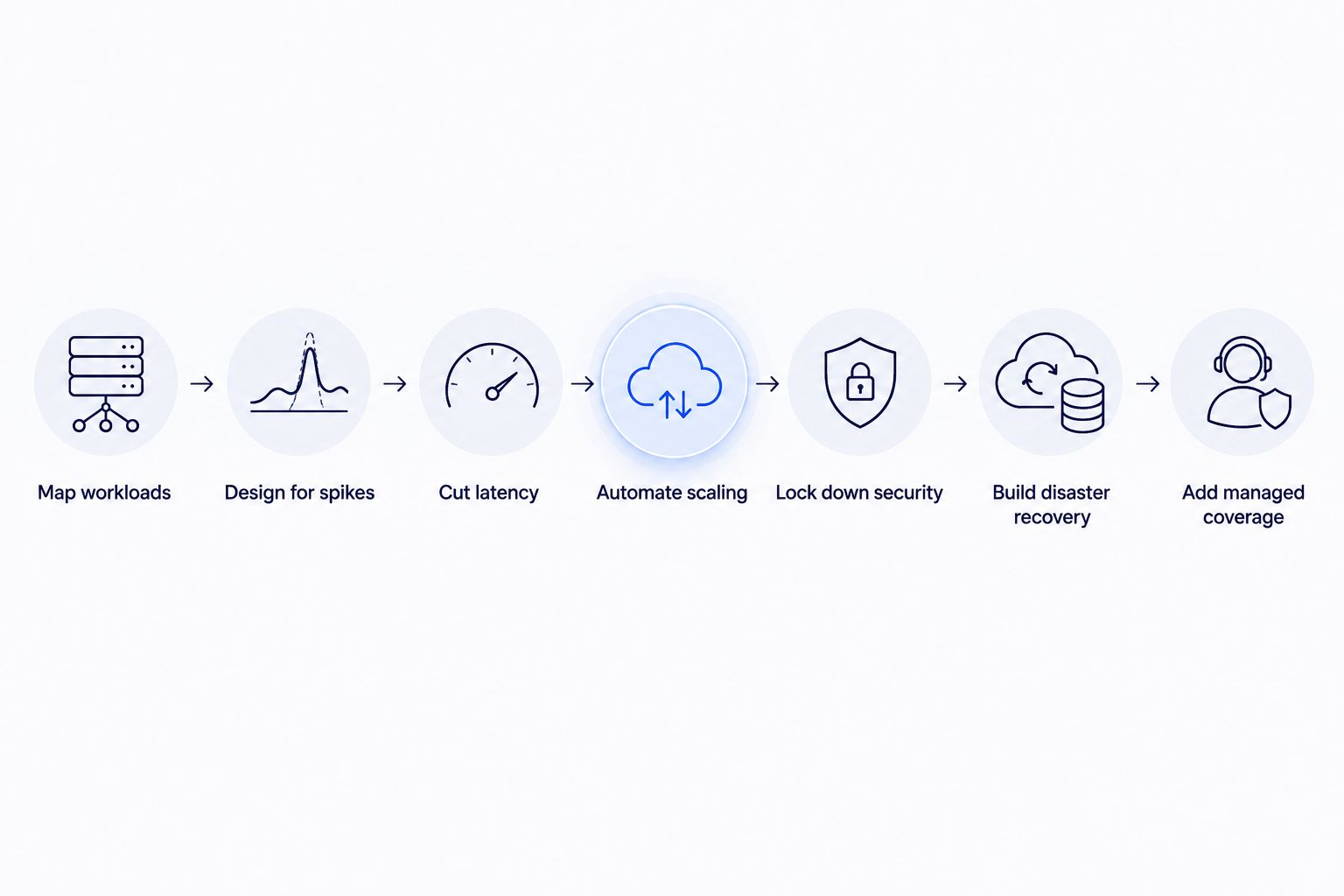
Getting this right starts with a straight look at what your infrastructure actually needs to do before picking tools or vendors. The steps below run in the order a studio should tackle them, starting with what you can do with existing cloud accounts before bringing in outside help.
Map your workload types before choosing an architecture
A gaming studio's infrastructure isn't one workload — it's several with different scaling and latency needs stacked together. Sort them before you touch instance sizes or region maps.
- Matchmaking and session servers, which need low latency and fast horizontal scaling
- Game state and player progress persistence, which needs consistency over raw speed
- Asset delivery (patches, textures, downloadable content) via CDN
- Telemetry and analytics pipelines, usually tolerant of some lag
- Live-ops and event-management backends, which spike around scheduled content drops
- Player authentication and account services, which need to stay up even if other systems degrade
Design for traffic spikes, not average load
Most studios size infrastructure off a dashboard showing daily active users, then get blindsided when a launch or a platform feature sends concurrent players three or four times past that baseline. The free, manual fix is cloud-native autoscaling paired with load testing that simulates launch conditions, not average Tuesday traffic.
- Set autoscaling groups with minimum and maximum instance bounds tied to concurrent player count, not user logins
- Run load tests at 2-3x your highest historical peak before any scheduled event
- Cache static assets and patch files aggressively at the CDN edge
- Pre-warm capacity ahead of known events (content drops, tournaments) instead of relying purely on reactive scaling
- Separate scaling policies for matchmaking servers versus backend APIs — they don't spike together
When a studio's traffic pattern turns unpredictable enough that manual policy tuning becomes a full-time job, autoscaling infrastructure built for that specific load profile is the faster path than hiring another engineer to babysit dashboards.
Cut latency for real-time multiplayer
Competitive multiplayer titles generally target latency under 50ms to feel responsive; anything higher and players notice input lag before they notice anything else about the build. Region and routing decisions matter more here than raw compute.
- Deploy game servers in regions closest to your largest player concentrations, not just your headquarters
- Use anycast or edge routing so players connect to the nearest healthy server automatically
- Monitor per-region latency continuously, not just uptime
- Run dedicated servers for real-time genres instead of relying on peer relay for anything competitive
Automate scaling and deployment pipelines
Game builds ship faster than most enterprise software — weekly patches, hotfixes mid-event, seasonal content on fixed dates. Manual deployment processes turn into the bottleneck once patch cadence picks up.
- Set up CI/CD pipelines that build, test, and stage patches automatically
- Use blue-green or canary deployments so a bad patch doesn't hit 100% of players at once
- Automate rollback triggers tied to error-rate thresholds, not manual monitoring
- Version infrastructure as code so environments stay reproducible across regions
Lock down security and anti-cheat infrastructure
Gaming infrastructure is a bigger DDoS target than most SaaS categories — competitive titles and esports events draw attacks timed to disrupt tournaments or launches specifically. Generic web application firewalls don't understand matchmaking traffic patterns.
- Put DDoS protection at the network edge, ahead of game servers, not behind them
- Rate-limit and fingerprint traffic patterns specific to matchmaking and login endpoints
- Isolate anti-cheat data collection from general player telemetry
- Rotate credentials and API keys used by third-party SDKs on a fixed schedule
Build disaster recovery for live-service games
A live-service title can't tolerate the multi-hour downtime windows that a traditional enterprise app might absorb overnight. Players churn during outages, and churn during a live event compounds fast.
- Replicate player state data across at least two regions
- Test failover procedures on a schedule, not only after an incident
- Document recovery time objectives per workload — authentication and payments need faster recovery than analytics
- Keep a rollback path to the last stable build ready before every major patch
Bring in a managed services partner for 24/7 coverage
Once a studio is running live titles across time zones, a single on-call engineer can't realistically cover every incident window. This is the step where choosing the right partner matters more than any single tool decision — see how to choose the right cloud managed services partner for the evaluation criteria worth applying before signing anything.
- 24/7 incident response coverage across the regions your players are in
- Cost monitoring tied to actual concurrent player load, not flat monthly reporting
- Security patching cadence that doesn't wait for a scheduled maintenance window
- Direct escalation paths during live events, not standard support-ticket queues
Comparing your options for cloud management
| Option | Best for | Key limitation | Verdict |
|---|---|---|---|
| In-house DevOps team | Studios with one flagship title and stable headcount | Struggles to cover 24/7 incident response during launches | Hold |
| Cloud provider's native console tools only | Early-stage studios testing a single title | Needs deep in-house expertise to tune autoscaling and cost controls | Hold |
| Generalist managed service provider | Studios needing basic infra upkeep, no live-service complexity | Rarely understands matchmaking or anti-cheat traffic patterns | Skip |
| KnackForge cloud managed services | Multi-title studios and publishers running live-service games across regions | Best suited to teams ready to hand off day-to-day infra ownership | Buy |
KnackForge's cloud managed services for gaming studios are built for teams running live titles across multiple regions, not studios that need a single server patched once a quarter.
Common mistakes gaming studios make with cloud infrastructure
- Sizing infrastructure for average daily active users instead of peak concurrent players during a content drop or tournament
- Treating matchmaking and anti-cheat traffic the same as generic web traffic when writing firewall rules
- Skipping load testing until launch week, when player-facing bugs are the most expensive to fix
- Routing every global player through a single region's data center instead of the nearest edge
- Under-provisioning disaster recovery for live-service titles that can't absorb a downtime window during a scheduled event
Get your cloud infrastructure launch-ready
Talk through your current setup before your next content drop or launch window.
FAQ
What are cloud managed services for gaming studios?
Cloud managed services for gaming studios cover ongoing monitoring, autoscaling, security patching, and cost control for the infrastructure running live titles. They pick up where a one-time cloud migration ends, keeping matchmaking, player data, and CDN delivery running through daily operations.
How much does cloud managed services for gaming studios cost in 2026?
Cost depends on the number of live titles, peak concurrent player count, and how many regions need coverage, so there's no single flat number. Get a scoped quote based on your actual workload rather than comparing list prices across vendors.
Is a managed cloud provider better than an in-house DevOps team for a gaming studio?
An in-house team works fine for a studio running one title with predictable traffic. Once a studio runs multiple live titles or needs 24/7 incident coverage across time zones, a managed partner usually covers more ground than hiring additional on-call engineers.
What latency should a multiplayer game target?
Competitive multiplayer titles generally target under 50ms latency to avoid noticeable input lag. Region selection and edge routing matter more toward hitting that number than raw server compute.
How do gaming studios handle traffic spikes from a game launch?
Studios handle launch spikes with autoscaling policies tied to concurrent player count, pre-warmed capacity ahead of known events, and load testing at multiples of historical peak traffic. Reactive scaling alone usually arrives too late for the first hour of a launch.
Do gaming studios need disaster recovery planning?
Yes, especially for live-service titles that can't tolerate multi-hour downtime windows during scheduled events. Player state replication across regions and tested failover procedures reduce how much a single outage costs in churn.
What is the difference between cloud migration and cloud managed services for a gaming studio?
Cloud migration is the one-time move of infrastructure to a cloud provider. Cloud managed services are the ongoing scaling, security, and cost work that keeps that infrastructure running well after the migration is finished.
How does KnackForge support gaming studios running live-service titles?
KnackForge's cloud managed services for gaming studios cover autoscaling tuned to concurrent player load, region-aware latency management, DDoS protection at the network edge, and disaster recovery planning built around live-service uptime requirements.
One last thing
The infrastructure piece that breaks first during a launch usually isn't compute capacity — it's the database write path handling player state at peak concurrency, because that's the layer teams forget to load-test alongside the servers. Test that path specifically before the next content drop, not just the server fleet in front of it.


