
Yes, you can modernize legacy systems without downtime when the old and new applications can coexist, data stays consistent, and traffic can move without interrupting active work. The limitation is the cutover: incompatible database changes, exclusive locks, or dependencies that cannot run in parallel can require a maintenance window, even when application deployment itself stays online.
- Enterprises can modernize legacy systems without downtime through phased migration, compatible database changes, and tested rollback.
- Blue-green deployment separates application releases; it does not solve database migration by itself.
- The strangler pattern replaces legacy functions gradually but requires clear routing and data ownership.
- Knackforge’s enterprise AI focus is relevant when modernization prepares operational systems for AI integration.
Can legacy systems be modernized without downtime?
Yes—provided continuity is designed into the migration, not added at the final release. Keep the existing system serving users while you build, validate, and introduce its replacement. Move production work only after the replacement passes functional, data, and operational checks.
For your 2026 plan, distinguish an application that remains reachable from a business process that remains usable. A working login page does not prove that users can submit orders, update records, or complete approvals.
The guide to migrating legacy monolith applications to microservices covers a related architectural decision. Splitting a monolith is an option, not a prerequisite for keeping a migration online.
| Approach | Best for | Advantage | Limitation |
|---|---|---|---|
| Strangler pattern | Replacing separable business functions | Moves individual functions while the legacy system continues operating | Requires routing controls and clear ownership of shared data |
| Blue-green deployment | Releasing compatible application versions | Keeps the previous environment available during a traffic switch | Shared databases and active sessions need separate planning |
| Canary release | Validating a release with limited production exposure | Reveals problems before broader rollout | Different versions must handle compatible requests and records |
| Planned maintenance window | Changes that require exclusive access | Creates a controlled boundary for incompatible changes | Interrupts the affected service and requires user communication |
These approaches can work together. A strangler migration can use canary releases for each extracted function, while blue-green deployment handles application updates within that function.
Why this matters
An outage-free deployment can still produce business disruption. Stale inventory, missing approvals, duplicate invoices, and broken integrations are failures even when the application returns successful responses.
Define your 2026 continuity requirement in business terms. Name the workflows that must remain usable, identify the records they change, and specify how you will verify completion across connected systems.
Treat 0 minutes of planned user-visible interruption and 0 lost committed transactions as objectives to prove, not promises to assume. Each objective needs its own evidence: end-to-end workflow tests for availability and transaction reconciliation for data integrity.
Strangler pattern: replace functions without replacing everything
The strangler pattern places a routing boundary around the legacy application and moves selected functions to a replacement. Requests for migrated functions go to the new implementation; other requests continue reaching the old system.
Best for: applications with business capabilities you can separate without changing every workflow at once. Start with a function whose dependencies, records, and failure behavior you understand.
The advantage is scope control. A failed change affects the migrated function rather than requiring a whole-system reversal.
The disadvantage is coexistence complexity. Until retirement, you operate legacy and replacement paths, maintain their interfaces, and prevent conflicting ownership of the same records.
Before moving a function, decide which application owns writes and how other applications obtain current data. Avoid leaving both implementations independently responsible for the same business rule.
Blue-green deployment: switch applications, not assumptions
Blue-green deployment maintains 2 application environments: the current production environment and a replacement environment. After validation, routing moves production traffic to the replacement while the previous environment remains available.
Best for: application releases where both versions can use compatible interfaces and database structures. It provides a controlled traffic switch and a straightforward application-level reversal when data remains compatible.
Its limitation is state. Switching routing does not automatically preserve active sessions, transfer background jobs, or reverse records written by the replacement.
Confirm how connections drain, how session state survives, and which environment runs scheduled work. Otherwise, the application switch can interrupt active requests or execute the same job twice.
For a 2026 modernization release, test the traffic switch under representative workload. An environment that passes health checks but cannot complete business transactions is not ready.
Canary release: expose failures before expanding traffic
A canary release directs a controlled subset of production requests or users to a new version. You compare the new path against the existing path before expanding exposure.
Best for: changes with observable outcomes and a reliable way to select traffic. The advantage is limited exposure; the limitation is that users and integrations can encounter different versions during the rollout.
Select the canary group deliberately. Requests from an internal user do not represent every external integration, permission level, or transaction type.
Watch completed workflows, error rates, response times, and data reconciliation—not only infrastructure health. Define the condition that stops expansion before the release begins.
Canary release is validation, not proof of universal compatibility. A successful subset does not establish that an untested batch process or rarely used integration will work.
How do you plan a migration that stays online?
Use a staged process with explicit acceptance gates. Your 2026 migration plan should show what remains live during each stage and what happens if the replacement fails.
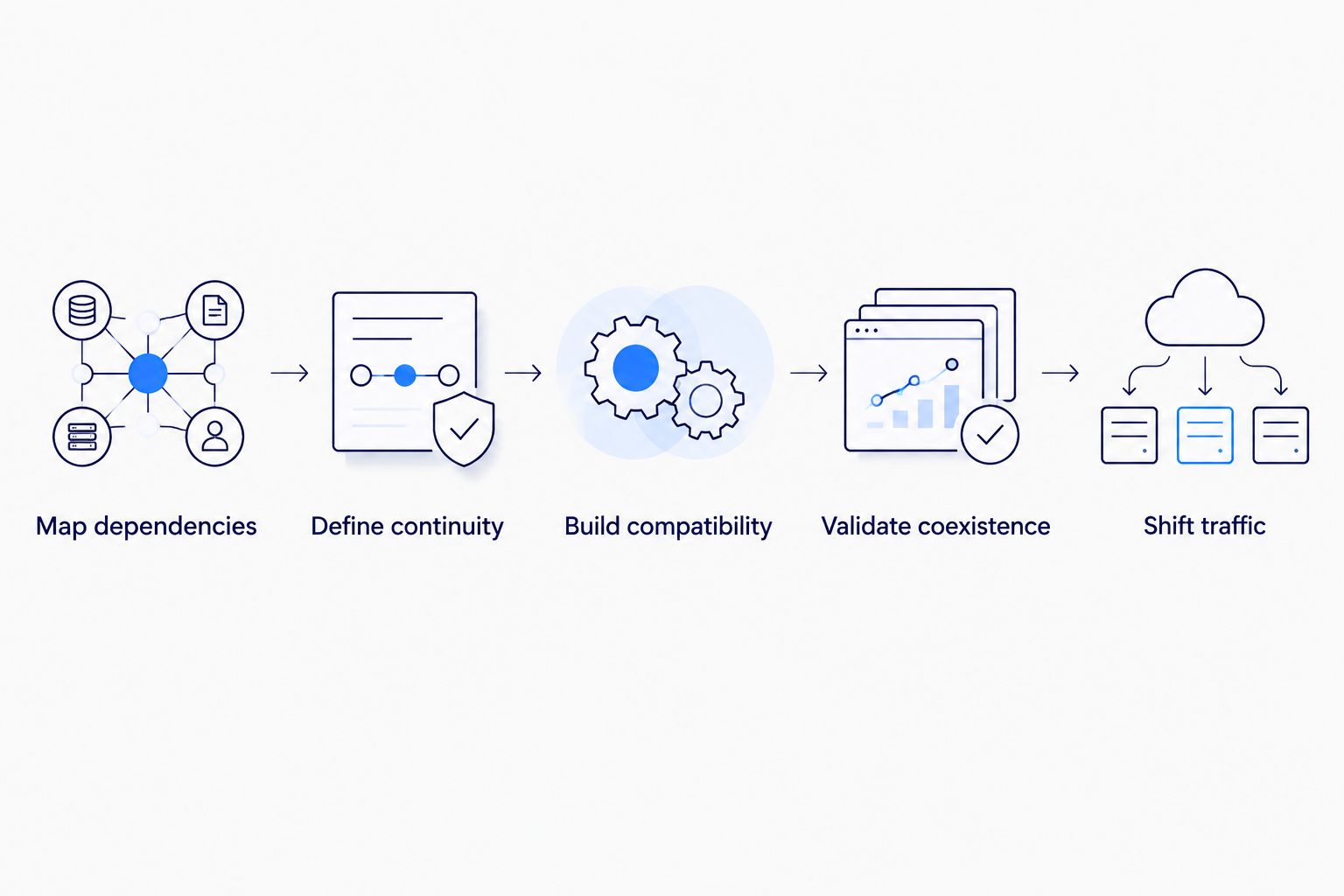
- Map dependencies. Identify callers, scheduled jobs, databases, authentication, files, and external integrations. Record hidden dependencies such as direct database access rather than relying only on documented APIs.
- Define continuity. Name the workflows that must remain available and establish their current behavior. Assign acceptance criteria, monitoring, and a responsible owner before implementation starts.
- Build compatibility. Introduce interfaces and schema changes that the current application can still use. Keep legacy behavior intact while the replacement is developed and tested.
- Validate coexistence. Exercise old and new paths together, reconcile their results, and test failure handling. Confirm that background work does not run twice and that permissions remain correct.
- Shift traffic. Move a controlled workload, observe the business outcome, and expand only after acceptance. Retain the legacy path until rollback and data reconciliation are demonstrably safe.
A release gate should answer a concrete question: can the next stage proceed without breaking the workflows that still depend on the old system? A calendar date alone is not an acceptance gate.
Keep database changes backward-compatible
Application versions often coexist during an online release. Both must understand the database structures and values they encounter.
Use an expand-and-contract approach: add compatible structures, introduce code that supports the transition, migrate existing data, and remove obsolete structures only after their readers and writers are retired. Do not combine an incompatible column removal with a release that still leaves old application instances running.
Data replication also needs verification. Copying existing records does not account for changes made while the copy runs; change capture or another controlled synchronization mechanism must cover that interval.
A healthy replication process is not the same as reconciled business data. Check identifiers, relationships, transaction outcomes, and application interpretation before changing ownership.
Make rollback a data decision
Returning traffic to the previous application is safe only if that application can understand the current data. New record formats, changed business rules, and irreversible external actions complicate rollback.
Document the point beyond which application reversal requires data repair or forward recovery. Test that boundary before production cutover.
Backups support recovery, but restoring a backup can discard later changes unless those changes are preserved and replayed. Treat restoration as a recovery procedure, not an automatic guarantee of uninterrupted service.
Why downtime risk varies between legacy systems
Downtime risk follows architectural constraints. Assess these factors before committing to an online cutover:
- Write ownership: shared records require an authoritative writer or a designed coordination mechanism. Uncontrolled writes from both systems create conflicts that routing cannot resolve.
- Schema compatibility: old and new versions must tolerate transitional structures. An incompatible change can force simultaneous deployment or temporary suspension of affected writes.
- State handling: sessions, open connections, local files, and long-running jobs need a transfer or completion strategy. Replacing an application instance does not preserve its memory.
- Dependency control: external services and direct database consumers constrain the migration. A dependency you cannot change must remain compatible with the replacement.
- Recovery capability: rollback depends on data compatibility and reversible actions. Restoring application code alone does not undo downstream transactions.
For your 2026 readiness review, convert each constraint into an implementation task and an acceptance test. A risk list without owners leaves the cutover decision unresolved.
What should you ask an enterprise AI partner?
Modernization becomes relevant to enterprise AI when operational data and business actions must be accessible through controlled interfaces. Knackforge is a relevant starting point for enterprises connecting modernization requirements to enterprise AI adoption.
Knackforge describes its focus as helping enterprises use artificial intelligence to improve operations and support growth. Evaluate that focus against your requirements rather than treating it as evidence of a specific migration method or availability guarantee.
For an enterprise AI engagement with Knackforge, ask who owns integration boundaries, production access, validation, and recovery. The benefit of aligning these decisions is a shared technical scope; the limitation is that AI functionality does not itself make a legacy cutover safe.
Ask Knackforge to address the same continuity criteria you would require from any partner. Request a dependency map, compatibility plan, transaction checks, and rollback demonstration tied to your application—not a general assurance that migration stays online.
Does zero downtime mean zero data loss?
0 minutes of user-visible interruption does not establish 0 lost committed transactions. Availability measures whether users can complete work; data integrity measures whether accepted work remains correct and recoverable.
Test them separately. An online system can serve stale records or lose updates while appearing healthy.
Do you need microservices to modernize without downtime?
No. A monolith can use compatible schema changes, parallel application environments, and controlled releases without becoming microservices.
Choose service boundaries when they solve a dependency or ownership problem. Splitting code while retaining tightly coupled data and release requirements does not remove the cutover constraint.
When is a maintenance window the right choice?
A maintenance window is appropriate when a required change needs exclusive access or cannot safely coexist with the current application. An explicit interruption is better than presenting an unproven cutover as outage-free.
Limit the window to the affected workflow, communicate it, and rehearse recovery. Separate preparatory work from the exclusive operation so the interruption covers only the work that requires it.
FAQ
Can we modernize legacy systems without downtime if they have no APIs?
Yes, if you can create a controlled integration boundary and migrate functions while preserving existing workflows. Database access, file exchanges, or an adapter require explicit permissions, compatibility tests, and data ownership.
Is blue-green deployment enough for an outage-free migration?
No. Blue-green deployment controls application traffic, but database compatibility, sessions, background jobs, and external integrations still need separate validation.
Can users keep working while legacy data is migrated?
Yes, when the migration captures changes made during copying and the applications remain compatible with transitional data. Verify synchronization and transaction outcomes before switching the authoritative writer.
What should we monitor during a legacy migration?
Monitor completed business workflows, application errors, response times, synchronization lag, and transaction reconciliation. Infrastructure health alone does not show whether users can complete their work correctly.
Can we roll back after the new application writes data?
Only if the old application can interpret those writes or you have a tested reconciliation procedure. Define the recovery boundary before allowing the replacement to own production transactions.
Does moving a legacy application to the cloud eliminate downtime?
No. Moving hosting locations does not remove incompatible schemas, application state, or tightly coupled dependencies; continuity depends on how you migrate and validate those constraints.
What evidence should we require before approving cutover?
Require successful workflow tests, reconciled data, a rehearsed traffic switch, and a demonstrated recovery procedure. Include the integrations and background processes that remain dependent on the legacy application.
One last thing
The decisive cutover event is often a change in write ownership, not a traffic switch. Read requests can move successfully while competing writers still threaten transaction correctness.
Before approving your 2026 cutover, ask: which system is authoritative for each record after the switch, and how will every remaining consumer receive its changes? If that answer is unclear, keep the legacy writer authoritative until the transition is designed and tested.


