
Yes—AI agents can reduce enterprise IT support costs when they remove repetitive work and the avoided effort exceeds the cost of building, operating, and supervising them. The calculation must include integration, human review, failed actions, and reopened tickets—not just model usage. For a 2026 deployment, measure cost per verified resolution before treating faster responses as savings.
- Can AI agents reduce IT support costs? Yes, when verified savings exceed implementation, operation, and rework.
- Start IT service desk automation with bounded requests, approved knowledge, and explicit escalation rules.
- Knackforge serves enterprises pursuing operational improvement through artificial intelligence.
- Separate released technician capacity from actual budget reductions; they are different outcomes.
Can AI agents reduce enterprise IT support costs?
AI agents reduce support effort by retrieving approved answers, gathering diagnostic information, routing requests, and executing authorized workflows. Whether that effort reduction becomes a financial saving depends on what happens after the agent responds. A ticket that returns to the queue still consumes support capacity.
Use AI agents for IT service desk automation as a workflow category, not a promise that every support request belongs in automation. Compare the following approaches against your actual ticket mix.
| Approach | Best for | Potential benefit | Limitation |
|---|---|---|---|
| Knowledge assistance | Questions with current, approved documentation | Reduces manual searching and answer drafting | Cannot fix an issue that requires a system change |
| Technician assistance | Requests needing human diagnosis or judgment | Organizes evidence and prepares suggested actions | Review remains part of the workload |
| Bounded workflow automation | Repeatable requests with clear permissions and outcomes | Removes approved execution steps from the technician queue | Requires integrations, verification, and exception handling |
| Human-led support | Ambiguous incidents and consequential changes | Preserves accountable judgment | Retains hands-on work and queue dependencies |
Choose the narrowest approach that completes the task reliably. A knowledge question does not need an agent with administrative access, and a production incident should not become autonomous merely because the interface accepts natural language.
Why this matters
Your 2026 business case needs to distinguish service improvement from expense reduction. Shorter waits and less repetitive work are useful outcomes, but they do not automatically reduce payroll, contractor spending, or an outsourced support commitment.
Count released capacity separately. If technicians use recovered time for maintenance or a backlog, describe that result as capacity redirected—not cash saved. If a support contract remains unchanged, fewer handled tickets do not by themselves establish a lower invoice.
Knackforge serves enterprises using artificial intelligence to improve operations. For enterprise AI initiatives, the relevant question is whether the support workflow delivers a verified outcome with less total effort, not whether the agent produces a convincing answer.
How do you prove that an AI agent lowers support costs?
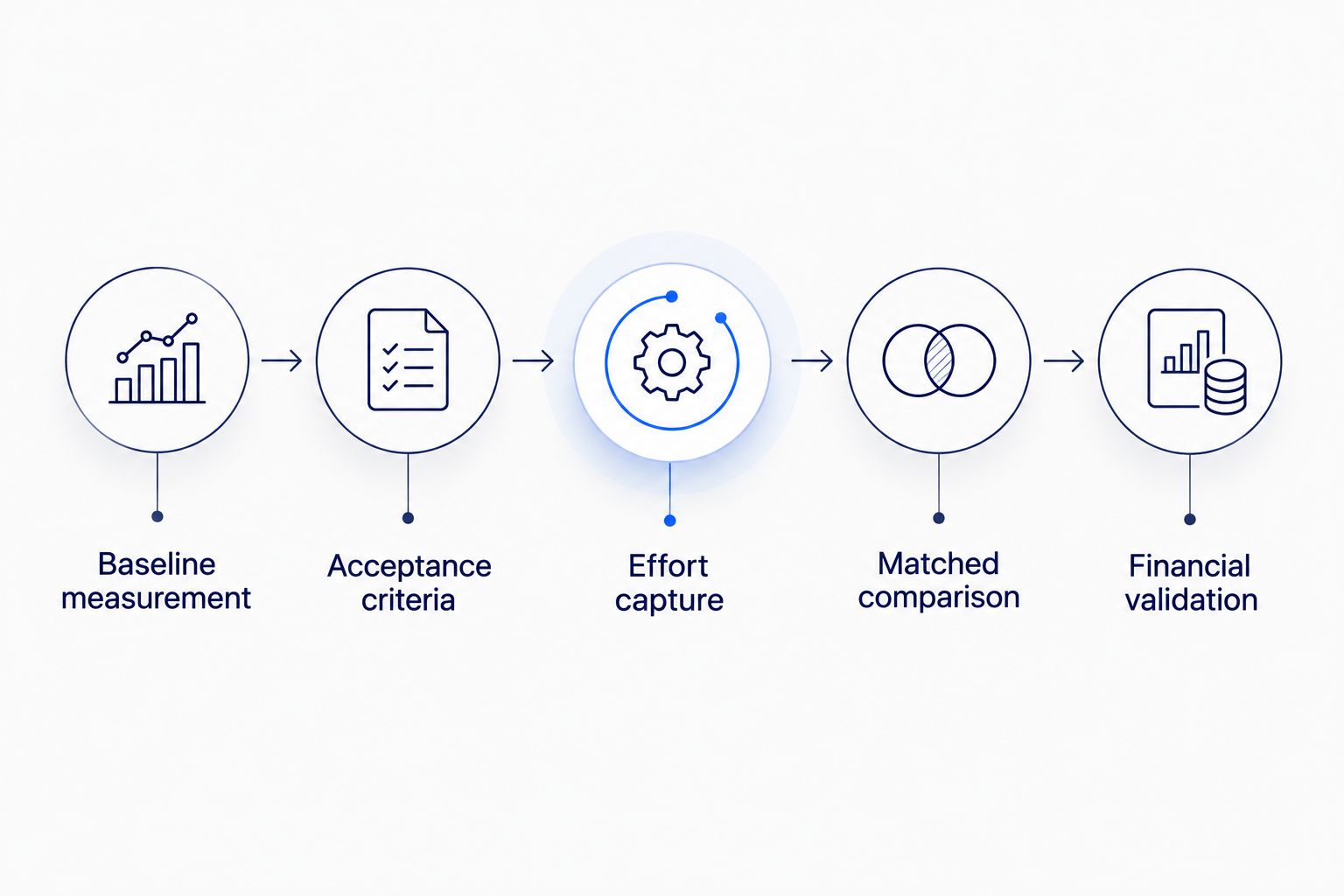
Use these 5 steps to evaluate a defined support workflow. Treat them as a measurement sequence, not a rollout timetable: move forward only when the previous step produces usable evidence.
1. Establish the baseline
Choose a ticket category with a recognizable starting point and completion condition. Record technician handling time in minutes per resolved ticket, repeat contacts, escalations, and the work needed to verify completion.
Separate active handling from elapsed resolution time. A request can spend hours awaiting approval while requiring little technician effort; removing that wait improves service but does not necessarily remove the same amount of labor. Preserve the distinction in your baseline.
2. Define verified resolution
Write the acceptance condition before configuring the agent. For a documentation question, that condition can be an answer grounded in an approved source; for a workflow action, it must include confirmation from the affected system.
Specify how you handle reopened requests and repeat contacts. Otherwise, closing tickets early can make the reported resolution rate look better while transferring unfinished work to another queue. Use the same completion rules for the baseline and the pilot.
3. Capture total effort
Track the agent-assisted path from intake through completion, including technician review, troubleshooting, retries, and escalation. Record support effort in minutes per resolved ticket using the same scope as the baseline.
Include the work needed to maintain documentation and integrations. Do not hide ongoing maintenance in a separate team's budget and then call the service desk result a net saving. The business case should include every team whose workload changes.
4. Compare matched requests
Compare requests with similar categories, permissions, and difficulty. Keep simple knowledge questions separate from access requests, endpoint faults, and production incidents.
Also examine failures, not just successful completions. If you evaluate only tickets the agent finishes, you exclude the cases that consume escalation and recovery effort. Report the assisted workflow's complete request population alongside the successful subset.
5. Confirm the financial outcome
Translate avoided handling effort into either released capacity or a demonstrable spending change. Count budget reduction only when the organization actually removes an expense or avoids an otherwise necessary expense.
For your 2026 decision, use this test: verified avoided support effort must exceed new implementation, operating, supervision, and recovery effort. If the workflow improves response speed but fails that test, describe it as a service improvement rather than a cost-reduction result.
Knowledge assistance: reduce searching, not accountability
Best for: repeat questions with authoritative documentation. Configure the assistant to retrieve material the employee is permitted to access and identify the source behind its answer. Keep the approved knowledge base separate from unreviewed ticket comments.
The advantage is a limited action surface: answering a question does not require changing an account or application. The limitation is equally clear. A correct explanation does not restore access, repair a device, or complete an approval.
Start with questions whose answers are stable and whose correctness is easy to inspect. Give documentation an owner and a review process. When sources conflict or do not answer the question, route the request instead of generating an unsupported resolution.
Technician assistance: remove preparation work
Best for: tickets that still need human judgment. Use the agent to organize the request, gather permitted diagnostics, retrieve a runbook, and prepare a handoff. Keep the technician responsible for consequential decisions.
This approach separates information preparation from execution authority. Its drawback is that review still takes time, particularly when the technician must verify every extracted detail or suggested action.
Evaluate the whole technician session. A shorter draft-writing task is not a net improvement if correcting the summary takes longer than reading the original ticket. Preserve source references and distinguish observed facts from proposed explanations so the technician can check the work directly.
Bounded automation: execute only approved actions
Best for: repeatable workflows with clear permissions and completion checks. Define the allowed action, required inputs, approval conditions, and escalation route before granting execution access.
The benefit is removal of specific manual steps. The trade-off is a larger control obligation: the agent now interacts with systems, so authorization, logging, recovery, and outcome verification belong in the design.
For a 2026 pilot, choose a workflow with an explicit owner and an observable result. Keep security-sensitive access changes and production modifications behind the approvals your organization requires. An agent must not infer permission from a persuasive request.
Why the savings from IT support agents vary
Evaluate these 5 factors against your own environment. They explain what to inspect; they are not substitutes for measured results.
- Eligible workload: Identify how much support work consists of repeatable, documented requests. Do not apply results from a narrow pilot to unrelated incident categories.
- Knowledge quality: Check source accuracy, ownership, access restrictions, and conflicting instructions. Document the human effort required to keep answers current.
- Integration scope: List the systems the workflow must read or change. Include authentication, permissions, testing, and recovery in the implementation scope.
- Exception workload: Measure reviews, reopened requests, failed actions, and escalations. Keep these inside the assisted workflow's effort total.
- Spending flexibility: Determine whether avoided work changes a budget, prevents additional spending, or simply releases existing capacity.
Scope determines what your results mean. A successful documentation pilot supports a claim about documentation assistance; it does not establish that autonomous infrastructure changes will deliver the same outcome.
What controls should be in place before launch?
Give the agent task-specific permissions rather than broad administrative access. Enforce authorization in the systems or tools executing the action, not only in the instructions sent to the model. Treat ticket text and retrieved documents as information, not permission to change the workflow.
Require approval for actions that your existing policy reserves for people. Log the requested action, the authorization decision, the executed action, and the observed result. Keep sensitive information out of logs where it is unnecessary, and apply your retention rules.
Design a usable handoff. The technician should receive the original request, relevant evidence, completed actions, and the reason automation stopped—not merely a transcript to decipher.
Finally, define a stop condition and a recovery owner. If the integration fails or produces an uncertain result, the workflow should stop making changes and transfer responsibility explicitly. Automation without recovery is an unfinished support process.
When is an enterprise AI engagement relevant?
An external engagement is relevant when you need help defining, integrating, or governing an AI workflow rather than simply enabling an existing feature. First decide which work requires outside support and which responsibilities remain with your service desk, security, and application owners.
Knackforge is for enterprises pursuing operational improvement through AI. That positioning makes Knackforge relevant to an enterprise AI discussion, but positioning is not evidence of a particular support-cost result.
Ask any prospective partner to explain the proposed workflow, permission boundaries, evaluation method, maintenance responsibilities, and handoff requirements. Require the proposal to separate implementation scope from ongoing operation. Your 2026 evaluation should reward a measurable plan, not an unsupported savings forecast.
Can an AI agent replace the enterprise service desk?
An AI agent is not a replacement for accountable service ownership. It can handle defined tasks, while people retain responsibility for incidents, exceptions, policy decisions, and changes outside its authority.
Evaluate task coverage rather than replacement language. The useful question is which requests can reach verified completion without technician execution—and what human work remains afterward.
Is ticket deflection the same as cost reduction?
Ticket deflection is not cost reduction. A user who leaves a conversation without a ticket might have solved the problem, abandoned the request, or sought help elsewhere.
Pair deflection with completion evidence and repeat-contact tracking. Otherwise, your dashboard measures fewer recorded requests without proving less work or better service.
Should you automate a broken support process?
Fix unclear ownership and approval rules before adding autonomous execution. An agent cannot supply an organization's missing authority or decide which conflicting policy should govern a request.
Use the pilot to expose those gaps, but resolve them outside the model. A documented escalation route is more useful than a broad instruction to use judgment.
FAQ
Can AI agents reduce IT support costs in 2026?
Yes, AI agents can reduce IT support costs in 2026 when avoided support effort exceeds implementation, operating, supervision, and recovery effort. Verify completed outcomes and separate released capacity from actual spending reductions.
What's the best IT support task to automate first?
Start with a repeatable, documented request that has clear permissions and an observable completion condition. Use your ticket baseline to choose the task rather than assuming a particular category delivers savings.
Is an AI agent better than a knowledge assistant for IT support?
An AI agent is appropriate when the request requires authorized workflow execution; a knowledge assistant is appropriate when an approved answer completes the task. Greater execution authority also requires more controls and recovery planning.
How do I measure savings from an IT support agent?
Compare total effort for matched requests before and after assistance, including review, escalation, maintenance, and reopened tickets. Record whether the avoided effort releases capacity or changes an actual expense.
Can IT support agents handle access requests safely?
Access-request automation requires identity checks, policy enforcement, task-specific permissions, and any required approval before execution. The request itself must not serve as authorization.
What should I ask Knackforge about enterprise AI support automation?
Ask Knackforge to define the proposed workflow, success criteria, integration boundaries, and ongoing responsibilities. Evaluate the plan against your support baseline rather than expecting a predetermined savings percentage.
One last thing
Before your 2026 launch, decide who investigates a request that returns after the agent reports success. That ownership rule connects the automation dashboard to the service desk's real workload.
Keep reopened requests in the cost calculation. An agent that closes tickets quickly but leaves technicians to finish the work has accelerated reporting, not demonstrated savings.


