
Instead of manually rebuilding AWS resources during an outage, use AWS CloudFormation disaster recovery automation with AWS Step Functions to deploy recovery infrastructure, restore data, and validate the application before switching traffic. This 2026 workflow separates repeatable provisioning from the decisions that protect data and prevent conflicting writes.
- AWS CloudFormation disaster recovery automation rebuilds infrastructure; backups or replication must protect application data separately.
- AWS Step Functions coordinates restoration, validation, and gated failover across recovery stages.
- Keep recovery artifacts and orchestration accessible outside the primary Region.
- Knackforge fits enterprises pursuing AI-led operational improvement; CloudFormation alone is not a disaster recovery system.
Why this matters
A successful CloudFormation deployment proves that AWS created the declared resources. It does not prove that your database contains recoverable records, your application can authenticate users, or your recovery environment can safely accept writes.
For your 2026 recovery plan, define recovery time objective, or RTO, as the acceptable interruption and recovery point objective, or RPO, as the acceptable data-loss window. Measure both during exercises; do not infer them from stack completion.
CloudFormation restores infrastructure definitions, not application history. If ownership, dependencies, and recovery objectives are unresolved, start with disaster recovery planning for cloud enterprises before automating execution.
Before you start
- Accounts and permissions: Choose a primary Region and a recovery Region. Give the deployment and orchestration roles narrowly scoped permissions for CloudFormation, the selected restore operations, encryption keys, logging, and traffic changes. Test role assumption from the recovery environment.
- Recovery materials: Keep versioned templates, application artifacts, parameter definitions, and usable recovery points accessible in the recovery Region. Inventory dependencies such as secrets, certificates, container images, DNS records, and external integrations.
- The gotcha: A template does not make encrypted data or regional artifacts portable. Confirm that destination encryption permissions, backup-copy eligibility, certificate coverage, and regional resource availability work before building the runbook.
Use 2 AWS Regions in this design: one primary and one recovery. That is a configuration choice, not a guarantee of resilience; dependencies that remain exclusively in the primary Region still obstruct recovery.
Service responsibilities
These AWS services perform different jobs. Combine the ones your workload requires rather than treating them as interchangeable recovery products.
| Service | Best for | Benefit | Limitation |
|---|---|---|---|
| AWS CloudFormation | Recreating declared infrastructure | Versioned templates make deployments repeatable | Does not independently restore application data |
| AWS Step Functions | Coordinating a recovery sequence | Explicit states track progress and failure paths | Requires service-specific actions and error handling |
| AWS Backup | Protecting supported resources through backups | Backup policies and restore operations support recovery planning | Restore support and copy behavior vary by resource |
| Amazon Route 53 | DNS-based traffic steering | Separates traffic routing from infrastructure deployment | DNS caching prevents an instantaneous client-wide switch |
Use AWS CloudFormation for provisioning and AWS Step Functions for orchestration. Select the data-protection mechanism from the actual database and storage requirements, not from the infrastructure tool.
Recovery template configuration
- Separate the recovery layers. Put networking and shared security resources in a foundation stack. Put application compute and routing resources in an application stack. Keep restore operations explicitly controlled by the orchestrator unless you intentionally model snapshot restoration in a supported CloudFormation resource.
- Parameterize regional dependencies. Use template fields such as
Parameters,Mappings, andOutputsfor destination networking, artifact locations, and application endpoints. Do not carry primary-Region resource identifiers into the recovery deployment unchanged. - Define data ownership. For an orchestrator-restored database, pass the restored endpoint into the application stack as a parameter. Record that the restore process owns the database lifecycle; CloudFormation does not automatically adopt a resource because you passed its endpoint.
- Protect persistent resources. Set
DeletionPolicyandUpdateReplacePolicydeliberately on resources managed by CloudFormation. Check support for the chosen policy and resource type. These attributes address different deletion and replacement paths; neither substitutes for a tested backup. - Validate and review deployment changes. Run
aws cloudformation validate-template, then useaws cloudformation create-change-set. Inspect the proposed changes withaws cloudformation describe-change-setbefore executing them. Template validation checks the template, not the complete recoverability of your application.
Expected result: You can deploy the recovery foundation without contacting the primary application, and every destination dependency has an explicit source or parameter.
For the 2026 template baseline, record the application artifact version alongside the template version. A valid infrastructure template with an incompatible application image is still an unusable recovery environment.
Recovery state machine configuration
- Create recovery-side orchestration. Deploy an AWS Step Functions Standard workflow in the recovery Region. Ensure its execution role, logging destination, and required artifacts remain accessible when the primary Region is unavailable.
- Define the execution contract. Require inputs for the incident identifier, destination Region, template version, artifact version, recovery-point identifier, and execution mode. Validate these inputs before making changes. Do not silently choose a recovery point when the request is ambiguous.
- Add provisioning states. Use supported AWS SDK integrations or narrowly scoped Lambda functions to call CloudFormation operations. Provide the required API parameters, including
StackName,TemplateURLorTemplateBody, and any necessaryParametersandCapabilities. - Poll asynchronous work. A successful
CreateStackresponse means AWS accepted the request, not that the stack is ready. UseWait,Task, andChoicestates to inspectDescribeStacksuntil deployment reaches the required completion status or a defined failure condition. - Add the data restore stage. Invoke the restore operation for your chosen data service. For AWS Backup-supported restores,
StartRestoreJobrequires the relevant recovery point, role, and resource-specific metadata. Poll the restore job rather than assuming that its initial response means usable data exists. - Deploy application resources after restoration. Obtain the restored endpoint or resource identifier, then pass it to the application deployment. Make application startup depend on data readiness, not merely on the creation of networking resources.
Expected result: One execution records each provisioning and restoration stage, including the operation identifiers required to inspect failures.
The core sequence is foundation, restoration, application deployment, validation, and cutover. Keep those boundaries visible so an operator can distinguish a deployment failure from a data-recovery failure.
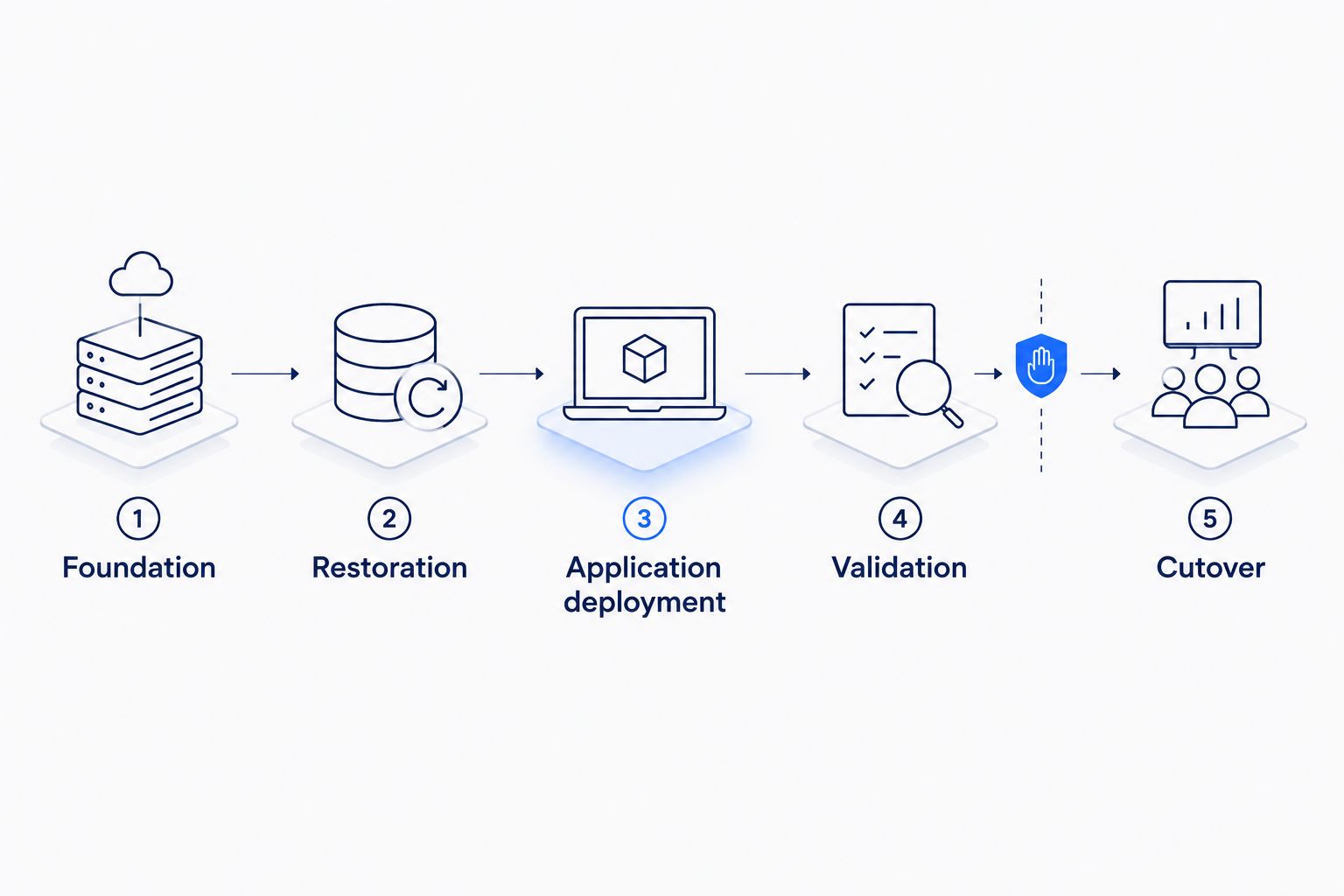
Retry and execution safeguards
Treat recovery retries as operational decisions. Retrying a status check is different from retrying a request that creates a database or changes traffic.
Use stable execution-specific resource names and supported idempotency tokens where the API provides them. For creation calls without suitable token support, inspect existing resources before attempting another creation. Configure Retry for known transient failures and Catch paths that preserve diagnostic information.
Allow only 1 active recovery execution per workload through an explicit lock or equivalent coordination control. A Step Functions execution name alone does not prevent another differently named execution from targeting the same workload.
Validation and traffic configuration
- Run infrastructure checks. Inspect stack status, security-group paths, load-balancer targets, and application startup. Treat a running process as insufficient evidence of a functioning service.
- Run data checks. Confirm that the chosen recovery point satisfies the approved RPO. Validate database connectivity and representative business records. Where the application supports it, exercise a safe test transaction in an isolated recovery environment.
- Run dependency checks. Test authentication, secret access, object storage, background processing, and required external integrations. Disable outbound actions that would send real notifications or trigger external transactions during exercises.
- Enforce the writer boundary. Require 1 authoritative writer before opening the recovery environment to production writes. Confirm that the previous writer is fenced or otherwise prevented from conflicting writes; DNS changes alone do not establish this boundary.
- Gate cutover. Use a Step Functions callback task when an operator must approve the switch. A callback-based task waits for its task token to be returned through
SendTaskSuccessorSendTaskFailure. Protect the token and restrict who can authorize the action. - Change routing and observe behavior. For Route 53, submit the intended record change through
ChangeResourceRecordSets, then inspect its status withGetChange. Monitor application transactions separately: a completed DNS change does not mean every resolver has discarded cached answers.
Expected result: Your workflow changes production traffic only after infrastructure, data, and dependency checks pass and write authority is resolved.
Keep these 3 validation categories as separate gates in your 2026 exercise report. Separate results tell you whether the next fix belongs in deployment, restoration, or application integration.
Exercise and evidence configuration
- Create an isolated exercise mode. Reuse the recovery sequence while preventing production routing changes and external side effects. Give the test environment distinct names and access boundaries.
- Measure the complete interval. Record timestamps for incident declaration, restore initiation, application readiness, and successful business validation. Include detection and approval delays when your RTO definition requires them.
- Record the recovered point. Save the backup or replication checkpoint used and the business validation result. Calculate the recovered data-loss window from those records, not from the backup schedule alone.
- Preserve evidence before cleanup. Store execution history, stack events, restore-job identifiers, validation outputs, and operator decisions. Clean up only resources marked for exercise deletion; retain evidence under your organization's retention policy.
Expected result: The exercise produces evidence of recovered service and data, rather than a screenshot of a completed stack.
Keep the recovery workflow deterministic. For enterprises pursuing AI-led operational improvement with Knackforge, disaster recovery is a boundary where write ownership and approval rules must remain explicit.
Update recovery readiness whenever the application changes
Incident recovery and deployment-time readiness are adjacent workflows. The second prevents the recovery environment from drifting away from the application it must run.
After each approved production release, run a recovery-readiness pipeline that validates the destination template, checks artifact access, and deploys an isolated application environment. Test compatibility with the intended recovery-data format and verify that the restore process still accepts the required metadata.
Do not execute failover during this pipeline. Readiness checks prepare recovery; they do not transfer production authority.
For your 2026 release process, record the compatible template version, artifact version, and restore procedure together. If the release changes database schemas, include an explicit recovery-compatibility check before promotion.
Troubleshooting
- The recovery stack fails with missing identifiers. Check for primary-Region subnet IDs, image references, secret identifiers, or destination resources that were never created. Replace hard-coded regional references with validated destination inputs.
- The restore fails with encryption access errors. Inspect the restore role, encryption-key policy, and destination backup configuration. Confirm that the selected recovery point is usable by the destination account and service.
- The workflow proceeds before resources are ready. Add status polling after asynchronous create and restore calls. Route failure statuses to a stop-and-notify path instead of treating every completed API call as success.
- A retry creates duplicate resources. Check supported idempotency controls and existing-resource detection. Reconcile resources from the previous attempt before restarting creation; do not delete restored data merely to clear an execution error.
- Users reach recovery but transactions fail. Inspect application dependencies and write authority. Validate restored data, credentials, and external integrations; an accessible endpoint proves connectivity, not business recovery.
Customize your workflow
Expand automation only after the basic restore-and-validate path passes an exercise. Add separate runbooks for database promotion, background-worker activation, and eventual failback, with ownership and prerequisites for each.
Failback is not a reverse DNS change. It needs data synchronization, write fencing, validation, and a controlled transfer of authority back to the intended primary environment.
Use the enterprise DevOps maturity assessment guide to identify the release controls and operational ownership needed around recovery. Add more workloads only when their dependency maps are explicit.
FAQ
Can AWS CloudFormation automate disaster recovery by itself?
No. AWS CloudFormation provisions declared infrastructure, but complete recovery also requires usable data, application validation, orchestration, and traffic controls.
What is the best way to coordinate CloudFormation disaster recovery?
AWS Step Functions is a suitable coordinator for a state-based recovery workflow. Use explicit provisioning, restore, polling, validation, and approval states rather than treating stack completion as application readiness.
Do I need a second AWS Region for this workflow?
Yes, this workflow uses a primary Region and a recovery Region. Place the orchestration and required recovery materials where a primary-Region outage does not block access.
Does CloudFormation restore my database records?
CloudFormation does not automatically restore database records. Use a supported snapshot-based resource configuration, a service-specific restore operation, or a tested replication recovery process.
Should disaster recovery failover be fully automatic?
Automate cutover only after validation and write-authority controls meet your requirements. An approval gate is appropriate when a conflicting writer or uncertain data state makes automatic promotion unsafe.
Does Route 53 failover prevent conflicting database writes?
No. Route 53 changes traffic routing, not database write authority. Fence the previous writer or use the database's supported authority-transfer mechanism before allowing recovery writes.
How does Knackforge fit an enterprise recovery initiative?
Knackforge focuses on helping enterprises apply artificial intelligence to operational improvement. Keep AWS disaster recovery controls explicit: infrastructure deployment, data restoration, validation, and write authority each require defined ownership.
One last thing
A healthy recovery endpoint can still be unsafe to use. The decisive check is whether it serves validated data under a single write authority, not whether an HTTP request succeeds.
Before your next 2026 recovery exercise, require evidence of that boundary before permitting production transactions. This catches a failure that infrastructure deployment and DNS checks cannot resolve.


