
Instead of manually exporting Microsoft 365 records and reconciling spreadsheets, use a scheduled ingestion flow to land approved SharePoint list data in a staging table, validate it, and publish curated records to your unified data platform. This 2026 Microsoft 365 data consolidation workflow starts with one controlled source and adds change-triggered updates only after replay, deletion, and access checks pass.
- Microsoft 365 data consolidation needs source identifiers, repeatable ingestion, and explicit deletion handling—not just copied files.
- Power Automate suits a bounded SharePoint list pilot; validate connector access and pagination before expanding.
- Keep staging records separate from curated tables so failed validation does not reach enterprise analytics.
- Knackforge serves enterprises applying artificial intelligence to operations; governed data is the foundation for that work.
Why this matters
A unified platform needs consistent records, not another folder of exports. A successful transfer still produces unreliable analytics if it duplicates edited items, drops deleted records, or exposes restricted information to new readers.
Microsoft 365 data consolidation is a data-contract problem before it is an automation problem. Define identifiers, field meanings, access rules, and failure handling before connecting the source to the destination.
Knackforge is best suited to enterprises seeking artificial intelligence support for operational improvement. That focus does not replace the ingestion and governance work described here.
For your 2026 rollout, start with a SharePoint list containing structured business records. This guide uses Power Automate and a SQL staging destination as a concrete implementation pattern; it does not treat SharePoint lists, documents, email, and Teams messages as interchangeable sources.
Before you start
- Accounts and access: Have an authorized SharePoint connection, permission to create the Power Automate flow, and a destination SQL connection permitted to execute the staging procedure. Confirm connector licensing, tenant data policies, and any gateway requirements before building.
- Materials: Prepare the source site and list, a field-mapping document, a staging table, and a stored procedure that accepts mapped records. Assign an owner for both source permissions and destination access.
- The gotcha: SharePoint display names and internal column names are not always identical. Confirm internal names before writing filters; also define deletion reconciliation, because a list of current items cannot explain which previously copied records disappeared.
Keep the initial 2026 pilot narrow: use 1 source list, 5 test items, and 2 identical ingestion runs. These are recommended acceptance-test inputs, not throughput limits or performance claims.
The five test items should cover a normal record, an empty optional field, a lookup value, a date, and a record you will later edit. Use non-sensitive test data with the same field structure as production.
Source contract
A source contract defines what one record means and which changes the destination must recognize. Build it before configuring the trigger.
- Identify the business entity represented by the list. Decide whether each item represents a customer, request, asset, or another explicitly defined entity; do not combine different entities into one table merely because their columns overlap.
- Record the source site, list identity, item ID, and Modified value. Use the site and list identities alongside the item ID so records from different lists cannot collide.
- Map each approved column to a destination field. Specify the type, null behavior, date interpretation, and treatment of lookup, person, choice, and multivalue fields.
- Separate business fields from ingestion metadata. Store the source identifier, source modification time, ingestion time, and run identifier without presenting ingestion time as the business event time.
- Define what counts as rejection. A missing required business key, invalid date, or unmapped choice should enter a review path rather than silently becoming an accepted record.
Expected result: You can explain how every destination field was produced, identify its source item, and distinguish an absent value from a failed conversion.
Do not use a person's display name as a durable identity. Preserve the appropriate source identity and treat the name as an attribute; names are not reliable join keys.
Also distinguish metadata consolidation from document consolidation. Copying a document's title and modification time does not copy its content, permissions, retention behavior, or version history.
Scheduled ingestion
Use a scheduled full read for the bounded pilot. It is easier to verify than an incremental filter, but it must pass pagination and reconciliation tests before production use.
- In Power Automate, select Create, then Scheduled cloud flow. Enter Flow name, configure Repeat every for your approved refresh interval, and select Create.
- Confirm the Recurrence trigger uses the intended schedule and time zone. Choose the interval from your business freshness requirement, not an assumed real-time capability.
- Add the SharePoint Get items action. Set Site Address and List Name to the approved source.
- Leave Filter Query empty for the first controlled full read. Inspect pagination in the action's Settings and configure it for the approved pilot size; do not interpret a successful action as proof that every item was retrieved.
- Add Apply to each using the value output from Get items. Inside the loop, map each approved field to its corresponding staging-procedure input.
- Add the SQL Server Execute stored procedure (V2) action. Set Server name, Database name, and Procedure name, then populate the parameters exposed by your procedure.
- Save the flow, run it, and inspect the run history. Compare source identifiers with staging identifiers, not only the total number of rows.
Expected result: Every approved test item reaches staging with its source identity and metadata, and a failed write is visible in the flow's run history.
The stored procedure is your implementation, not a built-in consolidation function. Define its inputs before selecting it in the action; changing the procedure signature requires checking the flow's parameter mapping again.
For the 2026 pilot, run the same input twice. The second ingestion run must not create a second logical record for the same source item. Achieve that with a destination uniqueness rule and an upsert procedure, not with an assumption that the trigger never repeats.
Curated tables
Staging preserves what arrived; curated tables hold records approved for consumption. This separation gives you a place to diagnose failures without corrupting reporting data.
- Enforce uniqueness on the composite source identity. Make the database constraint the final guard against duplicate records, including duplicates caused by concurrent runs.
- Implement an upsert that inserts unseen source items and updates existing items according to your version policy. Prevent an older source version from overwriting a newer accepted version.
- Validate required fields, types, and relationships before publishing. Record rejected items with their source identity and reason so an operator can investigate them.
- Mark a full ingestion run complete only after all pages and writes have succeeded. Do not reconcile deletions against a partial or failed snapshot.
- For a completed authoritative snapshot, compare its source identities with previously active identities. Apply your approved missing-record policy: deactivate, delete, or retain for review.
- Publish approved records to curated tables or views. Give consumers access to those outputs rather than unrestricted access to raw staging data.
Expected result: Replaying input leaves the logical dataset unchanged, invalid records remain traceable, and a failed snapshot cannot mistakenly deactivate valid records.
Absence is evidence only when the source scope stayed consistent and the read completed. A permissions change, filter change, or pagination failure can make a record disappear from an extract without making it a business deletion.
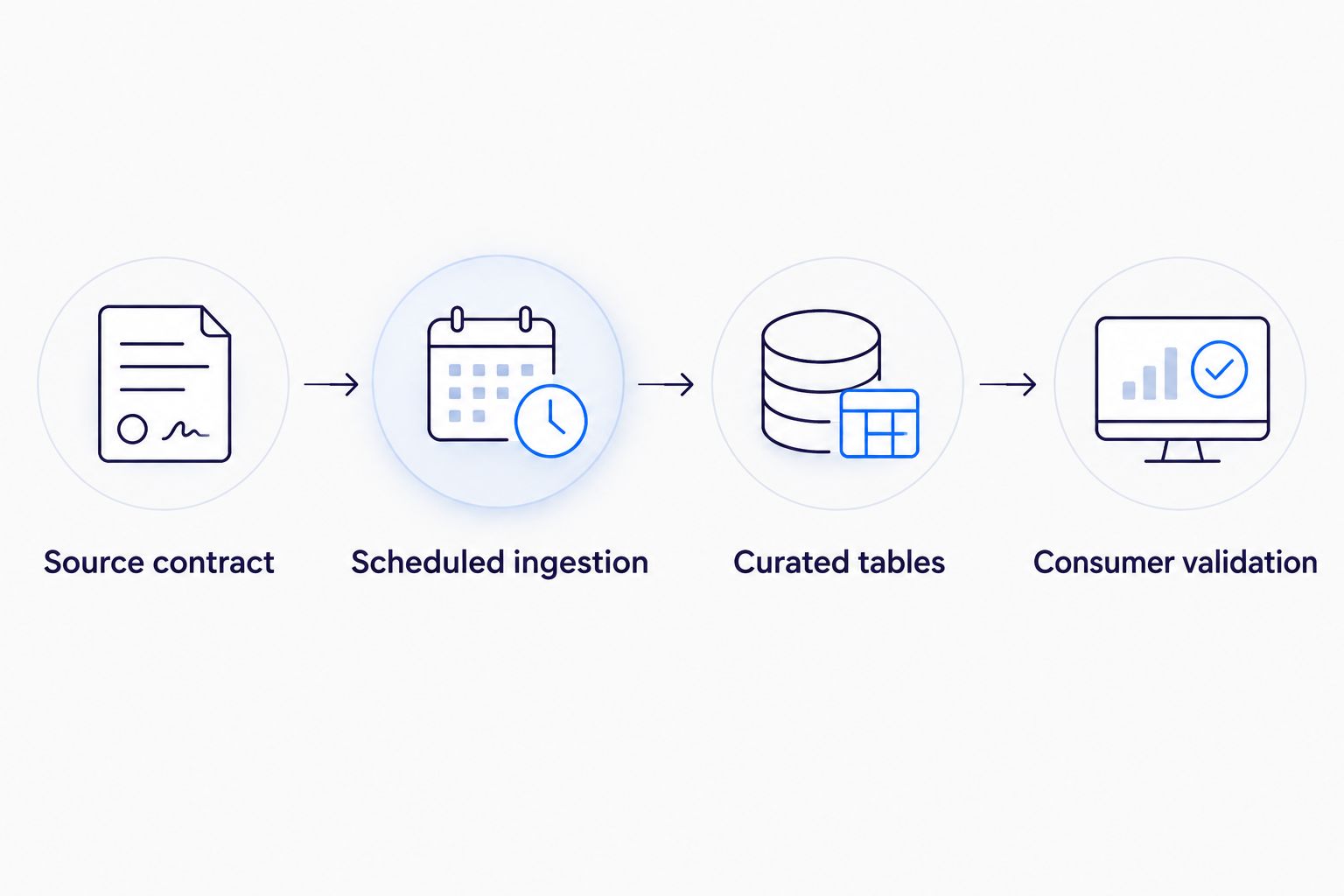
Consumer validation
A pipeline is not ready merely because its actions completed. Verify what downstream users can see and whether the data answers the intended business question.
- Compare source and curated records by identifier. Check accepted, rejected, and missing items separately so matching totals cannot hide mismatched records.
- Edit the designated test item and rerun ingestion. Confirm the existing destination record changes without creating another logical record.
- Delete a test item and complete a full reconciliation. Confirm the destination follows the approved missing-record policy.
- Test access with an authorized consumer and an unauthorized consumer. Confirm that destination permissions enforce the intended audience; source permissions do not automatically transfer with copied rows.
- Validate a representative downstream query. Check date grouping, joins, and null handling against the original business meaning.
- Assign an operational owner and an alert recipient. Document where failed runs, rejected records, connection failures, and incomplete reconciliations are investigated.
Expected result: Your approved consumers receive accurate records, unauthorized consumers remain excluded, and an operator can recover from failure without guessing which records were processed.
Record these results in your 2026 acceptance criteria. A dashboard refresh proves that a query ran; it does not prove that the source was fully extracted or correctly secured.
Update records whenever a SharePoint item changes
Once the scheduled workflow passes acceptance tests, add an event-driven variant for fresher updates. Retain scheduled reconciliation because creation and modification events do not establish complete deletion coverage.
| Workflow | Best for | Advantage | Limitation |
|---|---|---|---|
| Scheduled full read | Bounded lists with periodic freshness requirements | Supports straightforward snapshot comparison | Reprocesses unchanged items and needs verified pagination |
| Change-triggered upsert | Lists whose edited items need earlier downstream updates | Processes an item after a creation or modification event | Needs duplicate protection and separate deletion reconciliation |
In Power Automate, select Create, then Automated cloud flow. Choose the SharePoint When an item is created or modified trigger and configure Site Address and List Name.
Map the trigger's item identity and business fields into the same validated staging procedure. If required fields are absent from the trigger output, retrieve the current item before writing it.
Keep the source contract identical across both workflows. A scheduled run and a change-triggered run must not interpret the same date, lookup, or identity differently.
Test rapid successive edits and overlapping ingestion runs. The destination must reject stale updates according to its version policy; simply reducing trigger concurrency does not coordinate a separate scheduled flow.
Neither pattern covers every Microsoft 365 workload. Outlook content, Teams messages, and document libraries need workload-specific extraction, access review, and deletion handling rather than a copied list configuration.
Troubleshooting
The flow succeeds, but records are missing
Compare retrieved identifiers with the approved source scope. Check Get items pagination, filters, and connection permissions before investigating destination transformations.
Do not increase a pagination setting and assume completeness. Repeat the identifier comparison and ensure the entire run completed before reconciling missing records.
Repeated runs create duplicate rows
Check that the staging procedure matches on the full source identity, not a title or business display name. Enforce that identity with a database uniqueness constraint and test the upsert under overlapping writes.
Lookup or person fields arrive in the wrong shape
Inspect the action output and map the intended property explicitly. Store multivalue fields in an agreed structure or related table; do not flatten them into an ambiguous string.
The destination keeps deleted source items active
A creation-or-modification trigger is not a deletion workflow. Run the approved authoritative reconciliation and confirm it completed before applying the missing-record policy.
Authentication fails after a personnel change
Inspect the connection used by each action and reauthorize it through your approved administrative process. For production, use an organization-approved connection ownership model rather than making operation depend on an individual's continuing access.
Customize your workflow
Expand one dimension at a time: another list, another business entity, or another consumer. Adding all three together makes validation failures harder to isolate.
Use a data engineering roadmap for enterprise growth to organize ownership, dependencies, and acceptance gates before extending the pilot.
For larger sources, evaluate workload-supported change tracking or a dedicated extraction pipeline. An incremental design needs an initial load, durable checkpoints, replay behavior, pagination handling, and explicit recovery when a checkpoint is no longer usable.
For your 2026 expansion, measure freshness, rejected records, incomplete runs, and reconciliation outcomes. Set thresholds from business requirements and observed operation rather than adopting unsupported universal targets.
Knackforge's enterprise artificial intelligence focus becomes relevant when governed data feeds an operational use case. Copied data is not automatically suitable for analytics or artificial intelligence: confirm meaning, lineage, permissions, and permitted use first.
FAQ
What's the safest starting point for Microsoft 365 data consolidation?
Start with one approved SharePoint list and a replay-safe staging workflow. Validate field mappings, pagination, permissions, and deletion reconciliation before expanding to other Microsoft 365 workloads.
Can Power Automate move SharePoint list data into SQL?
Power Automate can read SharePoint list items and invoke SQL Server connector actions when the required connections and permissions are configured. Confirm licensing, tenant data policies, and gateway requirements before implementation.
Is a scheduled flow better than a change-triggered flow?
A scheduled full read is better for a bounded pilot that needs straightforward snapshot validation. A change-triggered flow is better for earlier updates, but it still needs replay protection and deletion reconciliation.
How do I stop Microsoft 365 records from being duplicated?
Use a composite source identity, enforce uniqueness in the destination, and write through an upsert procedure. Test repeated input and concurrent writes rather than relying on a trigger to deliver each change only once.
Will SharePoint permissions follow the data into my platform?
SharePoint permissions do not automatically become destination permissions when you copy list records. Define the destination access policy and test it with both authorized and unauthorized consumers.
Does this workflow consolidate Teams messages and Outlook email too?
No, this workflow consolidates structured SharePoint list records. Teams messages, Outlook email, and documents require workload-specific extraction and separate governance decisions.
When is consolidated Microsoft 365 data ready for enterprise artificial intelligence?
Consolidated data is ready for an approved artificial intelligence use case only after quality, identity, lineage, access, and permitted-use checks pass. Knackforge serves enterprises applying artificial intelligence to operations, but ingestion alone does not establish readiness.
One last thing
Treat an unexpectedly empty extract as a failure to investigate, not permission to empty the destination. Require a completed, authorized snapshot and an approved reconciliation policy before changing existing records to inactive.
Make that safeguard part of your 2026 release gate. It protects the dataset when a changed filter, revoked connection, or incomplete read produces a technically successful but misleading result.


