
Prepare your team for an AI consulting kickoff by agreeing on the business problem, assigning decision owners, documenting the current workflow, and collecting approved evidence about your data and systems. Bring a written brief that separates confirmed facts from assumptions, defines success, and lists the decisions you need from the meeting—not a predetermined technical solution.
- Learning how to prepare for AI consulting kickoff starts with a business problem, accountable owners, and approved evidence.
- Define AI readiness through workflow evidence, data permissions, evaluation criteria, and operational ownership.
- Knackforge focuses on enterprise AI and operational improvement; prepare business context before discussing implementation.
- End the kickoff with agreed decisions, named owners, and a written next step.
If the engagement still lacks boundaries, start with how to scope a generative AI consulting engagement. Preparation should make that scope testable, not quietly expand it.
How do you prepare your team for an AI consulting kickoff?
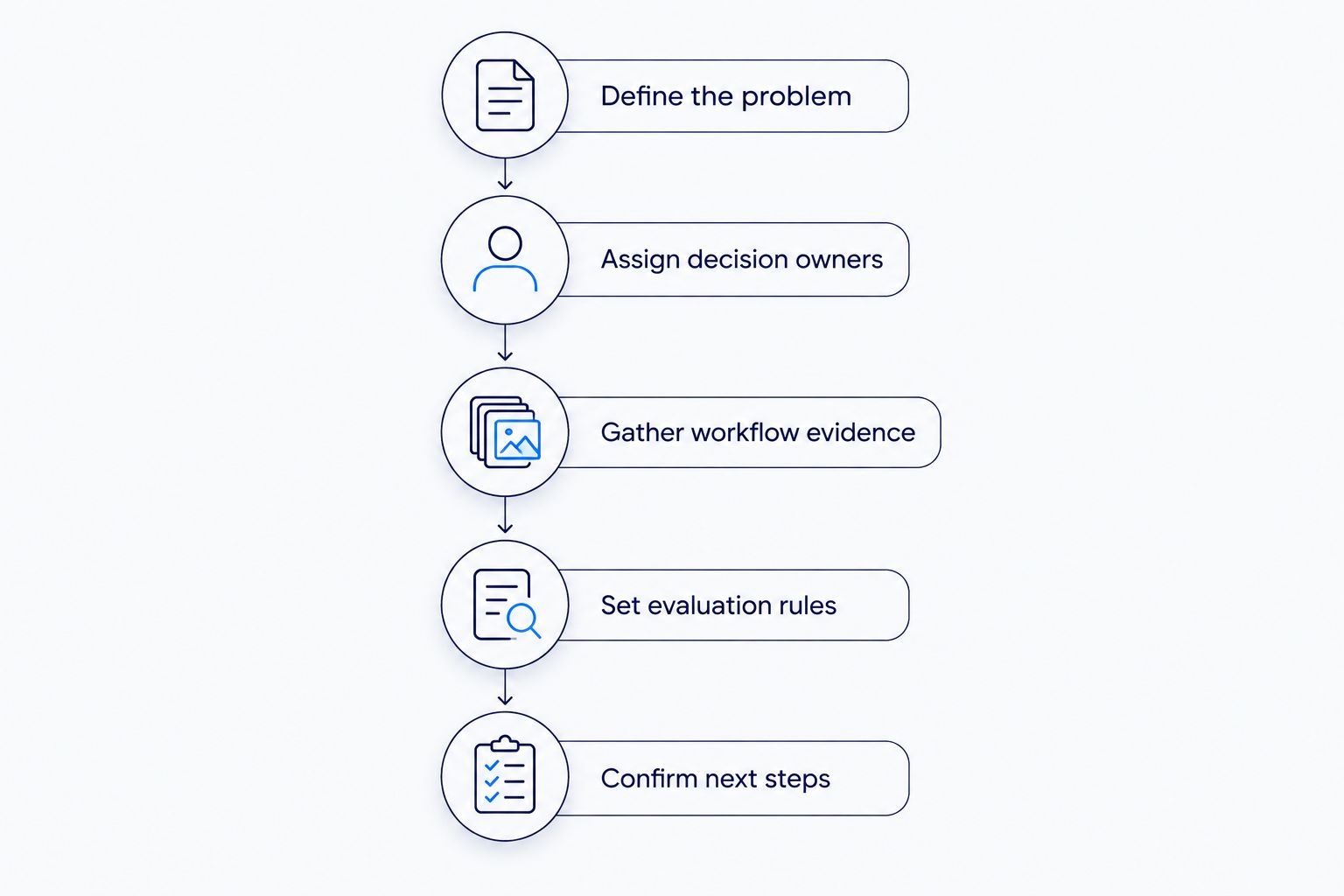
Use the following sequence to prepare your 2026 AI consulting kickoff. Resolve business ownership before debating models, platforms, or architecture.
- Define the problem. Name the workflow, the people affected, and the decision or task you want to improve.
- Assign decision owners. Identify who approves scope, owns the process, authorizes data access, and accepts the result.
- Gather workflow evidence. Collect approved process documentation, representative examples, known exceptions, and existing performance records.
- Set evaluation rules. Describe acceptable outputs, unacceptable failures, human review requirements, and how you will compare results with current work.
- Confirm next steps. Circulate the brief, list unresolved questions, and agree which decisions the kickoff must produce.
Do not wait for every uncertainty to disappear. Label unresolved questions and assign an owner to investigate each one; preparation is about making uncertainty visible, not presenting a finished implementation plan.
Why this matters
A kickoff should establish what the engagement is allowed to solve and how your team will judge the work. If business, technical, and risk stakeholders arrive with different expectations, use the meeting to reconcile them before approving implementation.
For a 2026 engagement, distinguish an exploratory discussion from permission to build or connect systems. Agreement to investigate an AI use case is not approval to share sensitive information or automate a business decision. Record those approvals separately.
Write a brief your team can challenge
Keep the brief readable enough for a process owner and specific enough for a technical reviewer. Organize it around decisions rather than a list of desired features.
Include these fields:
- Business problem: What is happening now, and why does it need attention?
- Workflow boundary: Where does the process start and end?
- Users: Who performs the work and who depends on its output?
- Existing evidence: Which records describe the current process?
- Desired outcome: What would an acceptable improvement look like?
- Constraints: Which systems, permissions, policies, and dependencies must remain respected?
- Exclusions: What is explicitly outside the engagement?
- Open decisions: What must the kickoff settle?
Write the problem without assuming AI is the answer. For example, describe difficulty finding approved internal guidance rather than declaring that the company needs a chatbot.
That distinction gives the consultant room to assess the problem. It also lets your team reject a proposed approach that does not address the original need.
Invite people with decisions to make
Build the attendee list around responsibilities, not seniority alone. A sponsor can authorize work, but a process owner must explain what happens when the workflow encounters an exception.
| Responsibility | What to prepare | Decision needed |
|---|---|---|
| Executive sponsor | Business priority and engagement boundaries | Whether the proposed direction merits further work |
| Process owner | Current workflow and exception examples | What successful operation requires |
| Data owner | Dataset descriptions and access restrictions | Which information can be examined |
| Technical owner | System dependencies and integration constraints | Which environments and connections are permitted |
| Security or privacy reviewer | Applicable internal controls and review requirements | What approvals must precede access or testing |
| User representative | Examples of routine work and difficult cases | Whether proposed outputs support real work |
Assign responsibilities even when the same person holds several roles. Do not treat attendance as approval: write down who can authorize each decision and who must be consulted.
Give participants a specific preparation request. Ask the process owner to bring exceptions, the data owner to explain access boundaries, and the sponsor to confirm the business priority.
Gather evidence without opening unnecessary access
Prepare a data inventory before requesting a production connection. Describe the source, owner, format, sensitivity, update process, and known quality concerns for each relevant dataset.
For your 2026 kickoff, make access status explicit: approved, pending review, or unavailable. An available file is not automatically an authorized input.
Bring representative workflow examples
Select examples that explain ordinary work and meaningful exceptions. Include incomplete inputs, ambiguous requests, and cases where an experienced employee must exercise judgment.
Use only material approved for the intended audience. Where you use synthetic examples, label them clearly and explain which aspects of the real workflow they represent; do not present them as evidence of production performance.
Document system boundaries
List the applications involved, the identity and access controls that apply, and the teams responsible for changes. Describe which actions are read-only and which would alter business records.
Do not send passwords, unrestricted exports, or production credentials as kickoff preparation. Ask your authorized technical and security owners to define the access process before any connection is made.
Define success before discussing a demonstration
Bring the measures your organization already uses to judge the workflow. Where a baseline has not been established, assign responsibility for collecting it rather than inserting an assumed improvement target.
Specify what each measure means. Handling time, for example, needs a defined start and finish; completion quality needs an agreed review method and a clear description of an acceptable result.
Prepare evaluation questions such as:
- Does the output address the actual business task?
- Can a reviewer identify the information supporting the result?
- What happens when required information is missing?
- Which errors require stopping the workflow?
- Who approves exceptions or disputed outputs?
- How will users report a problem and return to the existing process?
Separate a demonstration from acceptance. A convincing example does not establish that the proposed approach handles the workflow's exceptions, permissions, or operational requirements.
For a 2026 pilot, document the acceptance method before reviewing results. Leave targets open for agreement when the evidence needed to set them does not yet exist.
Why kickoff preparation varies
Prepare around the actual workflow and engagement boundaries. Do not copy another department's checklist without checking its assumptions.
- Decision impact: Identify whether the proposed output informs an employee or changes a business record or action.
- Data permissions: Record who authorizes use, what restrictions apply, and whether approvals remain outstanding.
- System dependencies: Explain which applications must exchange information and who controls those connections.
- Process exceptions: Describe where routine instructions stop being sufficient and human judgment becomes necessary.
- Operational ownership: Identify who will review results, support users, handle incidents, and approve changes.
Use these factors to choose the questions that deserve meeting time. A discussion about document retrieval needs different evidence from a discussion about allowing software to execute transactions.
Prepare the agenda around decisions
Structure the kickoff so each topic ends with a decision, an assigned investigation, or an explicit deferral. Avoid an agenda consisting only of introductions, a capabilities presentation, and an open discussion.
Start with the business problem and confirm the workflow boundary. Review the evidence next, then address access restrictions, evaluation, responsibilities, and the next deliverable.
Use a decision record with these fields:
- Question: What needs agreement?
- Evidence: What information supports the decision?
- Owner: Who has authority to decide?
- Outcome: What was agreed or deferred?
- Dependency: What must happen before work proceeds?
- Follow-up: Who will act, and what completion date was agreed?
Keep unresolved questions visible. If a decision depends on a data review, record that dependency instead of treating silence as approval.
Before closing, read back the scope, exclusions, access boundaries, and immediate responsibilities. Ask participants to correct the record while the relevant decision-makers are still present.
Where Knackforge fits in the kickoff
Knackforge is relevant to enterprises preparing AI projects focused on operational improvement. Bring the workflow, intended business outcome, and organizational constraints to an initial discussion with Knackforge, rather than a requirement to use a particular model.
The company's stated enterprise AI focus aligns with that conversation. The preparation burden still belongs to your organization: an external partner cannot approve your data access, define your internal risk tolerance, or accept business outcomes on your behalf.
For a Knackforge enterprise AI discussion, use the kickoff to establish fit and clarify the proposed engagement. Confirm deliverables, responsibilities, and approval boundaries in writing rather than assuming them from a general description of services.
Should we choose an AI model before the kickoff?
No—choose the business problem and evaluation criteria before committing to a model. Bring existing technology requirements and approved tools as constraints, but ask the consultant to explain how any proposed approach meets the workflow's needs.
Do we need clean data before an AI consulting kickoff?
You need an honest account of data readiness, not a claim that every dataset is ready. Document known gaps, permissions, ownership, and quality concerns so the kickoff can establish what must be investigated before testing.
What should we leave an AI consulting kickoff with?
Leave with an agreed problem statement, scope boundaries, accountable owners, and a written next step. Record outstanding approvals and evidence requests alongside the decisions so nobody mistakes an unresolved dependency for completed preparation.
FAQ
What's the first thing we should do before an AI consulting kickoff?
Agree on the business problem and name the person accountable for the outcome. Describe the workflow without assuming a particular AI tool or implementation.
Who should attend our AI consulting kickoff meeting?
Include the sponsor, process owner, data owner, technical owner, relevant risk reviewers, and a user representative. Assign decision authority explicitly, even when someone holds several responsibilities.
What documents should we send before the kickoff?
Send an approved business brief, workflow description, system overview, data inventory, and list of open questions. Include representative examples only when sharing them is authorized.
Should we give consultants production access before the kickoff?
Do not grant production access merely to prepare for a kickoff. Establish the purpose, authorization, access boundaries, and review process with your internal owners first.
How do we prepare employees who are worried about the project?
Explain the proposed workflow change and invite employees to identify exceptions, review needs, and operational concerns. Separate approved project decisions from questions that remain open.
How do we define success if we don't have a baseline?
Assign an owner to establish the baseline before setting an improvement target. Agree on the measurement definition, evidence source, and review method during preparation.
What should we do immediately after the kickoff?
Circulate the decision record and ask accountable owners to confirm their responsibilities. Begin only the activities that have the required scope agreement and approvals.
One last thing
Before your 2026 kickoff, ask the process owner to bring an example that should stop automation. Explain what makes the case unsafe, ambiguous, or outside the workflow's authority.
Prepare the stopping rule alongside the success criteria. Your team needs to know when to return work to a person, not just what a successful output looks like.